Issue:
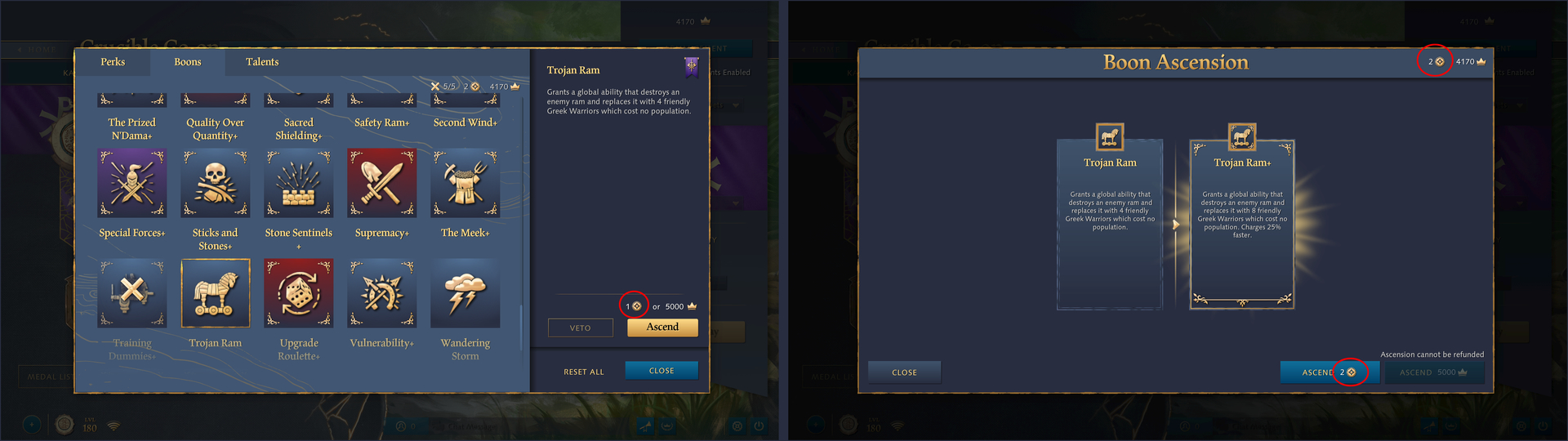
In The Crucible Boons menu, the displayed cost for upgrading a Boon through Boon Ascension is incorrectly shown in the upgrade screen.
The Boon Ascension upgrade cost displayed in the Boons menu is correctly listed as 1 token. However, when opening the upgrade screen for that Boon, the displayed cost matches the player’s current Boon Ascension Token balance instead of the actual upgrade cost.
For example, if the player has 2 Boon Ascension Tokens, the upgrade screen displays a cost of 2 instead of the correct cost of 1.
Trigger Event:
Opening the Boon Ascension upgrade screen for a Boon while having multiple Boon Ascension Tokens.
Repro Steps:
- Boot the game.
- Wait for the main menu to load.
- Enter The Crucible.
- Enter the Advancement screen and select the Boons tab.
- Locate a Boon available for a Boon Ascension upgrade and check its displayed upgrade cost.
- Ensure the current Boon Ascension Token balance is higher than 1.
- Open the upgrade screen for that Boon.
- Observe the displayed upgrade cost.
Expected Result:
The Boon Ascension upgrade screen should display the fixed upgrade cost of 1 token, regardless of the player’s current Boon Ascension Token balance.