Issue:
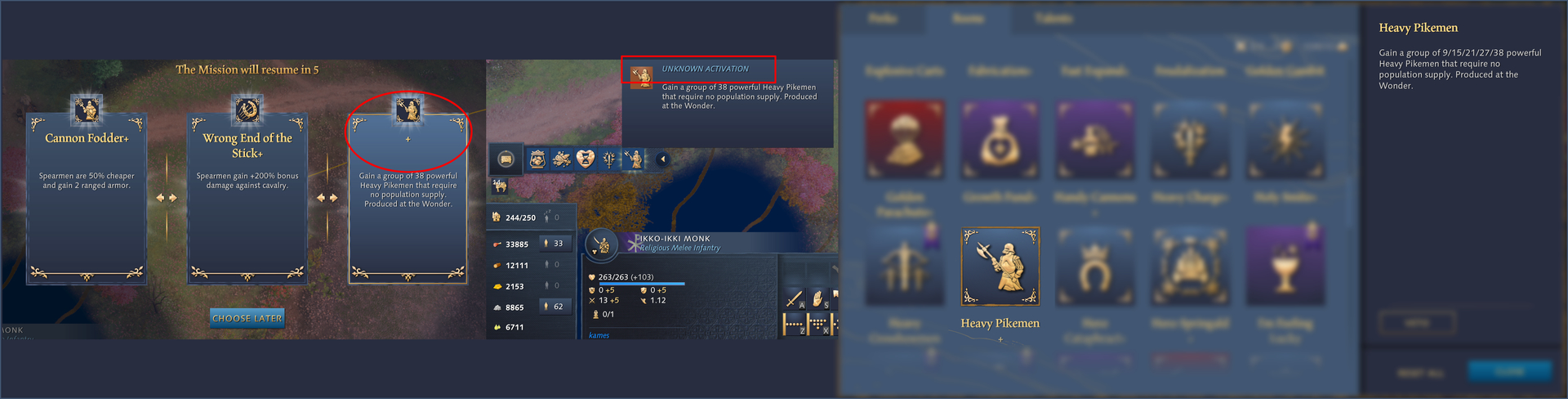
The Heavy Pikemen boon, after being upgraded to Ascension level and becoming Heavy Pikemen +, is incorrectly displayed in the UI. When the upgraded boon becomes available during a boon selection, its name is displayed only as “+” instead of “Heavy Pikemen +”. Additionally, after selecting it, the boon is displayed as “Unknown Activation” in the selected-boons UI instead of showing its correct name.
The issue occurred during the fifth boon selection, when the final-tier version of the boon became available and offered 38 Pikemen.
Trigger Event:
Reaching the fifth boon selection and having the Heavy Pikemen boon upgraded to Ascension level (Heavy Pikemen +).
Repro Steps:
- Boot the game.
- Wait for the main menu to load.
- Select either The Crucible (Solo) or Crucible Co-op from the main menu.
- Open the Advancement screen in the Crucible lobby.
- Navigate to the Boons section.
- Locate the Heavy Pikemen boon.
- Upgrade the boon to Ascension level.
- Return to the Crucible lobby.
- Navigate to the Missions section.
- Select a mission and start the match.
- Progress through the mission until the fifth boon selection becomes available.
- Locate the Heavy Pikemen + boon, which offers 38 Pikemen.
- Observe that its name is displayed only as “+” instead of “Heavy Pikemen +”.
- Select the boon.
- Inspect the selected-boons UI.
- Observe that the boon is displayed as “Unknown Activation” instead of “Heavy Pikemen +”.
Expected Result:
The upgraded Heavy Pikemen boon should display its correct name, “Heavy Pikemen +”, in both the boon selection UI and the selected-boons UI. The name should not be replaced by “+” or “Unknown Activation”.