Issue:
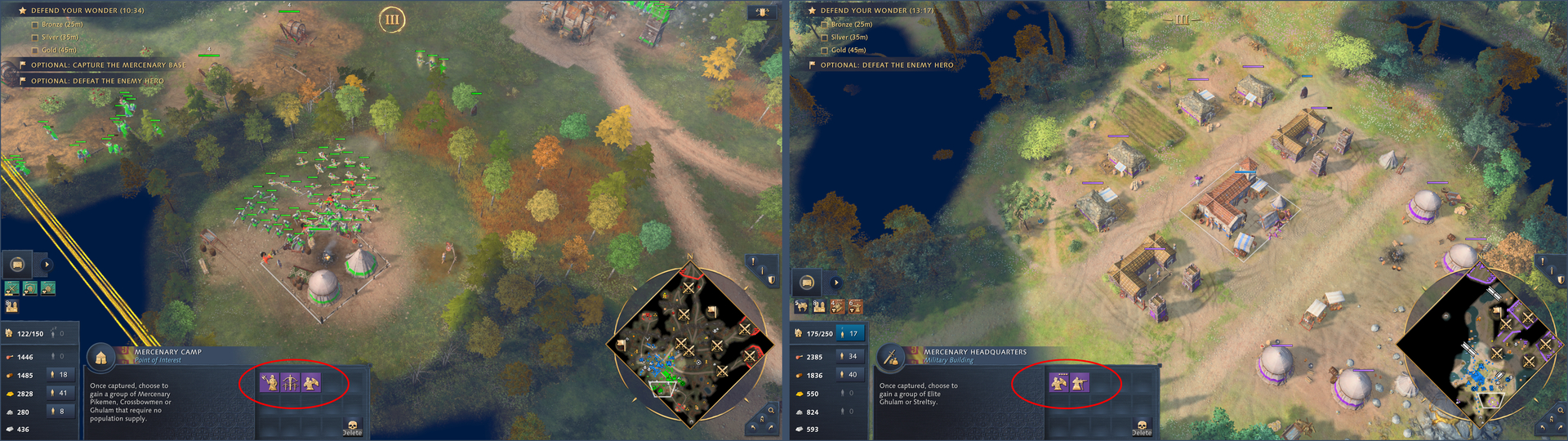
In Crucible missions, the mercenary units available through certain capturable neutral locations do not have keyboard shortcuts assigned to their respective production buttons.
This issue has been observed at the Mercenary Camp Point of Interest on the Forest Lords map and the Mercenary Headquarters on the Contested Coastline map.
After capturing these locations, mercenary units can only be produced by clicking their respective buttons, as no keyboard shortcuts are available.
Trigger Event:
Selecting a captured Mercenary Camp on Forest Lords or Mercenary Headquarters on Contested Coastline.
Repro Steps:
- Boot the game.
- Wait for the main menu to load.
- Select either The Crucible or Crucible Co-op from the main menu.
- Navigate to the Missions section.
- Select the Forest Lords mission or the Contested Coastline mission.
- Start the mission and wait for the map to load.
- Locate and capture the Mercenary Camp on Forest Lords or the Mercenary Headquarters on Contested Coastline.
- Select the captured location.
- Inspect the available mercenary production buttons.
- Attempt to produce a mercenary using the corresponding keyboard shortcut (Q, W, or E).
- Observe that no keyboard shortcuts are assigned to these buttons and that mercenaries can only be produced by clicking them.
- Repeat the test on the other map and in the other game mode.
Expected Result:
Mercenary production buttons at captured neutral locations should have functional keyboard shortcuts, allowing mercenary units to be produced using the keyboard, just like units from other production interfaces.