Update 19.18658 – Crash when starting any game mode (Steam)

:play_button: GAME INFORMATION

:backhand_index_pointing_down: These details are CRITICAL; DO NOT skip them or your issue may not be reviewed.

  • GAME BUILD #: 100.19.18658.0
  • GAME PLATFORM: Steam
  • OPERATING SYSTEM: Windows 10

:play_button: ISSUE EXPERIENCED

:backhand_index_pointing_down:After updating Age of Empires III: Definitive Edition to build 100.19.18658.0 on October 21, 2026, the game crashes every time I attempt to start a match.

The main menu works normally, but launching either a Skirmish match or a Campaign mission immediately causes a crash and opens the game’s crash reporter.

The game worked perfectly before the October 20 update.

Troubleshooting already performed:

  • Verified Steam game files — no errors found.

  • Reinstalled the game completely.

  • Restarted Windows.

  • Tested with a fresh user profile.

  • Tested Steam Offline Mode.

  • No mods installed.

None of these steps resolved the issue.

System:

  • NVIDIA GeForce GTX 1660 Ti

  • Intel Core I7 9750H

  • 24 GB RAM

  • Steam version: 100.19.18658.0

The Age3Log.txt file does not contain a clear crash reason. I can attach the log for investigation.

Please investigate this regression introduced after the latest update.

:play_button: FREQUENCY OF ISSUE

:backhand_index_pointing_down: How often does the issue occur? CHOSE ONE; DELETE THE REST!

  • 100% of the time / matches I play (ALWAYS)

:play_button: REPRODUCTION STEPS

:backhand_index_pointing_down: List CLEAR and DETAILED STEPS we can take to reproduce the issue ourselves… Be descriptive!

Here’s the steps to reproduce the issue:

:play_button: EXPECTED RESULT

:backhand_index_pointing_down: What was SUPPOSED to happen if the bug you encountered were not present?

:play_button: IMAGE

:backhand_index_pointing_down: ALWAYS attach a PICTURE (.jpg, .png, .gif) or VIDEO (.mp4, YouTube link) that highlights the problem.

:play_button: GAME FILES (SAVE / RECORDING)

:backhand_index_pointing_down: Attach a SAVE GAME (.aoe3Ysav) or GAME RECORDING (.aoe3Yrec) of the match where you encountered the issue. Link it below if using an external file service.
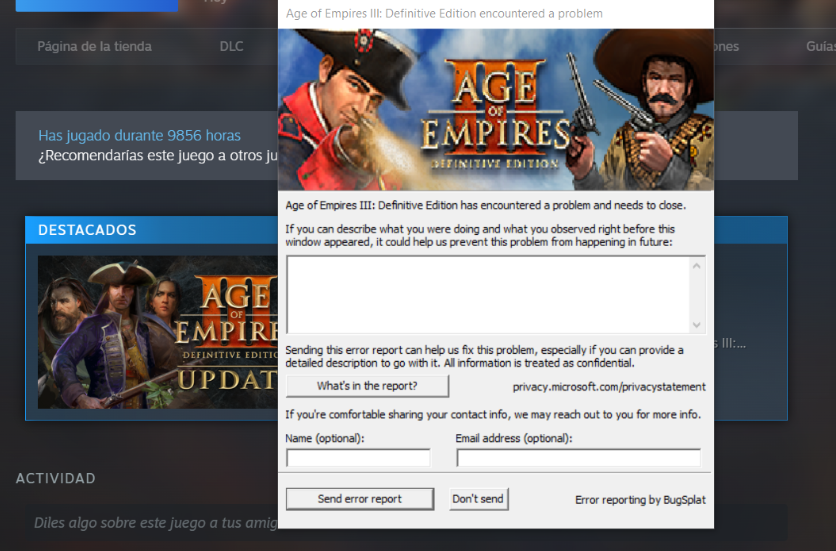
es un problema serio, ya que deshabilita el juego es triste que con cada actualización perjudiquen la jugabilidad del juego

删掉dlc破解补丁就好了。。。。。。。。。。。。。。。。

Hey Tata, if I translated your reply right, then thanks for the suggestion. However, I’m using a completely legitimate Steam version with officially purchased DLCs (not all purchased). No cracks, DLC unlockers or mods installed. I’ve even reinstalled the entire game, but the crashes persist after the October 20 update.

Me aparece exactamente la misma ventana de error. Por desgracia, parece que lo único que podemos hacer es esperar a que los desarrolladores lo solucionen con un parche. :sweat_smile:

igual me paso que se crasheo asi, pero solo fue una vez y ni tengo idea por que fue, creo por que tenia un navegador abierto o estaba descargando otro juego en ese momento, espero hayas podido conseguir arreglar eso colega

¡Gracias, colega! :grinning_face_with_smiling_eyes: Lamentablemente, todavía no he podido solucionarlo. El juego se cierra cada vez que intento iniciar una partida, incluso después de reinstalarlo por completo. Ya he enviado un informe al soporte técnico, así que espero que lo arreglen pronto con una actualización.

Por cierto, también voy a probar a iniciar el juego sin tener el navegador abierto, a ver si hay suerte. ¡Gracias por la idea!

¡Un saludo!

Espero que consigas solucionarlo colega, que tenga un buen dia

Sorry, I thought you were Chinese. There have been a lot of cases recently in the Chinese community where games crash due to the cracked patche.

Our cracked patche runs like a mod, so may be your crash also result from some old mod, try disable all your mod.

No worries, and thanks for explaining! :grinning_face_with_smiling_eyes: I don’t have any mods installed, and I’ve already tried a completely fresh profile and a full reinstall, but the game still crashes. It seems to be a different issue in my case. Hopefully the developers will fix it soon. Or I’ll run through official support basic suggestions, which seem non-relevant to me, but still, may be it will help. Thanks for trying to help!

yes I have this same issue…I miss playing my game I only have legit game and DLC doesn’t run past main menu on any game mode

I have this exact same issue. I would love to be able to play any mode

Hi @Strapon_Queen !

Can you send a new crash report with your username, “Strapon_queen” in the description? It would be easier for me to find it and see if we can investigate it

Please let me know once you do it and I look for it

Thanks in advance :blue_heart:


Buenas @Strapon_Queen !

Podrías mandar un reporte de crash nuevo poniendo tu usuario en la descripción? “Strapon_queen”? Me resultaría más facil encontrar tu reporte y ver si podemos investigarlo

Porfi avisame cuando lo hagas y así lo busco

Gracias por adelantado :blue_heart:

Hello IkoKnight!

Yeah, sure, if I got your request right, then it’s done now.

Thank you very much for looking into this crash. Please let me know if I can provide a further help!

Anything new here? I am experiencing the same issue after last patch. Been playing the game with no problem the past 3 years but after update 19.18658 the game keeps crashing when starting any match. No fix seems to work

Hey FlexyKoker,

Welcome to the club!)) The situation is not hopeless, one of the Dev’s expressed interest in our matter only 2 or 3 days ago, so perhaps it will be eventually fixed. I’ve also did almost everything expect re-installing Windows clean, so it’s waiting in patience phase now.

I appreciate the feedback mate.

I just wanted to put that out there cause there is several people experiencing this exact issue after the last update. I’ ve read a few reddit posts reporting this as well:

We just wait for a fix I guess

Age of Empires III: Definitive Edition crashes when loading any game mode after the latest update

Hello everyone,

I’m experiencing a persistent crash in Age of Empires III: Definitive Edition since installing the latest game update.

Problem description

The game launches normally, and I can access the main menu without any issues. However, whenever I try to start a match, the game closes unexpectedly during the map loading process.

This happens in all tested game modes:

  • Offline Skirmish

  • Original Campaign

  • Online Multiplayer

The loading countdown completes, but the game crashes when the map is about to load.

Troubleshooting already performed

I have already tried the following:

  1. Verified the integrity of game files through Steam.

  2. Removed all mods (the game log confirms that no mods are enabled).

  3. Configured Windows Graphics Settings to force the game to use the dedicated NVIDIA GPU.

  4. Checked DirectX compatibility using DxDiag.

  5. Checked the game log file (Age3Log.txt).

Unfortunately, none of these steps resolved the issue.

System specifications

  • Laptop: Acer Aspire A515-54G

  • CPU: Intel Core i5-10210U

  • RAM: 20 GB

  • Operating System: Windows 11 64-bit

  • Dedicated GPU: NVIDIA GeForce MX250 (2 GB VRAM)

  • Integrated GPU: Intel UHD Graphics

  • NVIDIA Driver: 32.0.15.8278 (June 24, 2026)

  • Intel Graphics Driver: 26.20.100.6911 (May 27, 2019)

DirectX diagnostic results

Both graphics adapters report DirectX 12 support and Direct3D feature levels including 11_0 and 11_1.

DxDiag reports no problems with either graphics adapter.

However, the game log contains the following message:

“Machine does not meet min specs: Your video hardware does not support DirectX 11 which is required for Age of Empires III DE.”

This appears to contradict the actual hardware capabilities reported by DxDiag.

Additional information

The issue started immediately after the latest game update.

The game previously worked correctly on this same laptop, using the same hardware and graphics driver.

The problem persists across all tested game modes, including offline gameplay.

Could the development team investigate a possible graphics initialization or DirectX detection regression introduced by the latest update?

I can provide the complete Age3Log.txt file and additional diagnostic information if needed.

Thank you for your help.

Greetings Felipeee,

There was a dev just several posts up, I believe they’re trying to fix the issue, at least, they’re aware.
The funny thing, it seems that most victims of this patch and crash are laptopers.
And it’s interesting that you actually have something in log, mine and others are just empty.

Well, welcome to the club, take a seat, enjoy the rest, relax :wink:

Hey everyone!

New patch is just dropped, finally able to start a match, no crashes for me anymore!

Enjoy the game, people!

Thank you @IkoKnight and all dev team!