AoE3DE Flag Maker Pack

Yes, your “Flag Icon.psd” file can be used as the background for The Expeditionary icons, however, those icons have additional graphics on top. For example, the " British Expeditionary Company" has a rifle icon on top of the flag background (per screenshot below). Therefore, your “Flag Icon.psd” file cannot be used to replace The Expeditionary icons, unless the modder uses software to corp out the icon on top and place it on the “Flag Icon.psd” file
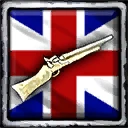
BritishExpeditionaryCompany_icon

In terms of inspiration flag, your “Object Flag.psd” file can be used to modify the inspiration flag model in the game. I tested the American one, replacing the “spc_americans.ddt” file after transforming the “Object Flag.psd” file works perfectly fine. (For Mexican, I assume you could replace the “mexican.ddt” file instead, but I have not tested it out)

Unless you were talking about inspiration flag icon, then yes, it would need a new file to replace that icon
Oh yes, I actually have prepared the icons to put on them as I worked on it with Ernestin1 on that part. I’ll contact him soon and try to include it in the next release.

And yes, I meant the icon of the inspiration flag.

Hi EmpAhmadK, I hope you are well, I would like to ask you to add the “flag maker” of inspiration flag icons, I am currently working on a project that uses that icon (It also serves to return to your country of origin, as with the revolutions in Mexico), and I would really appreciate it if you would add it.

Thank you very much for this wonderful tool.

1 Like

Thank you very much for your work and your tools…It’s very practical.

Thank you so much.

1 Like

Hi, I’ve been testing out this tool. It seems very handy, but I’m a bit of a slow learner here. My question is regarding the object flag, I can’t figure out how to export it as a DDT file. I’m using Photopea, and there isn’t such an option as default, and I’m not sure how to use Resource Manager to convert an existing file to DDT.

Hayy
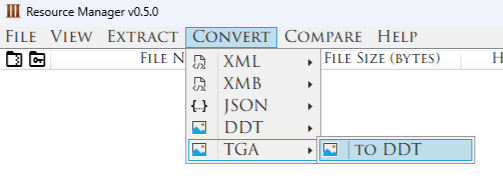
You need to export the file as TGA
And then when you open the resource manager, you go to " Convert " and then TGA → DDT

The numbers on a TGA file have a meaning too.
here is a raw list what numbers to use inwhhich texturing work:

Usuage: 0,1,6,8 (0, common across unit textures) (1, Common across building texture) (6, use for bump map) (8, use for cube map)

Alpha: 0,1,4,8 (0, common across unit) (1, common across building) (4, for no team colour, such as under construction building) (8, terrarin blending)

Format: 1,4,7,8,9 (1, 32 bit uncompressed RGBA) (4,DXT1) (7, Grayscale) (8, DXT3) (9, DXT5) you can range these numbers however you like, but must consider optimisation.

Mipmap Levels: 0-10 (10, for units) (10-6 for buildings) (1 for UI or homecity (anything that cant be zoomed in)) you can range these numbers however you like, but must consider optimisation.

3 Likes