P1. Game loading taking long time (5+ minutes), be it single player skirmish or ranked games or custom lobby.
P2. Civilization selection OR page transitions taking long time (~ 30-60 seconds).
P3. Assertion failure error asking to debug application with Visual C++ documentation, see image.
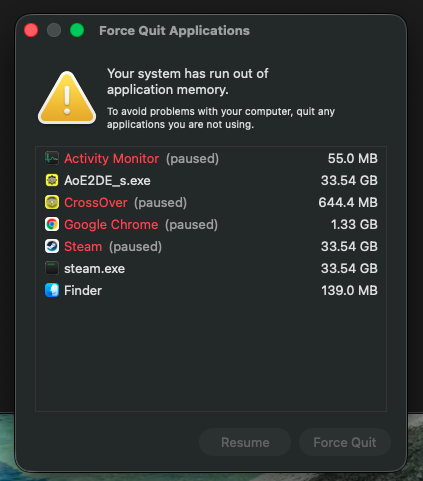
P4. After playing for a couple of hours, system runs out of application memory causing system wide lag.
Observation:
System resources like Memory (35+ GigaBytes) and CPU (223% utilization) have been hogged when AoE2DE_s.exe process runs for few hours causing system wide lag. See attached screenshots from 2026-06-10.
FREQUENCY OF ISSUE
100% of the time / matches I play (ALWAYS)
REPRODUCTION STEPS
List CLEAR and DETAILED STEPS we can take to reproduce the issue ourselves… Be descriptive!
Here’s the steps to reproduce the issue:
Update macOS. Install CrossOver. Create Windows 10 Bottle and Install Steam. Login and Download AOE2.
Install DirectX into the same bottle, turn ON - DXVK, High Resolution Mode, and MSync.
Pre June 2nd Patch performance was fine, post patch performance degraded.
EXPECTED RESULT
What was SUPPOSED to happen if the bug you encountered were not present?
None of the above issues experienced would appear. The games would load in reasonable time of around few seconds, civ pick taking few seconds and no running out of application memory even after playing for long hours.
IMAGE
ALWAYS attach a PICTURE (.jpg, .png, .gif) or VIDEO (.mp4, YouTube link) that highlights the problem.
GAME BUILD: Age of Empires II: DE
GAME PLATFORM: Steam - CrossOver
OPERATING SYSTEM: macOS (Windows 10 Bottle)
ISSUE EXPERIENCED
Since the June 2nd update (177723), I’m experiencing constant freeze/stutter during gameplay. The game locks up for 1-3 seconds repeatedly, making it unplayable.
STEPS TO REPRODUCE
Launch AoE2 DE via Steam on CrossOver (Windows 10 bottle)
Start any match (skirmish or ranked)
Freezes occur throughout the entire session and worsen over time
EXPECTED RESULT
Game should run smoothly as it did before the June 2nd patch.
WHAT I’VE TRIED
Switched graphics to D3DMetal in CrossOver
Disabled texture mods
Limited FPS to 60
Disabled all advanced graphics options
Verified game files via Steam
None of these resolved the issue. The problem started immediately after the June 2nd patch and was not present before. This appears to be the same issue reported in this thread. Adding my case to support prioritization of a fix.
GAME BUILD: Age of Empires II: DE 178524 (Build ID: 23629752)
GAME PLATFORM: Steam — CrossOver v26.2
OPERATING SYSTEM: Windows 10 bottle on macOS, hardware: Mac mini (2024) M4, 24 GB RAM
ISSUE EXPERIENCED
Adding my case to confirm the post-June-2-patch regression already reported in this thread. Same setup, same symptoms.
Symptoms:
P1. Game loading takes far longer than before the patch — affects single player skirmish as well as multiplayer. I am now consistently the last player to finish loading into multiplayer lobbies, where previously I was among the first.
P2. Page transitions and menu navigation are sluggish.
P3. Repeated freeze/stutter during gameplay — the game locks up for 1-3 seconds and then rapidly catches up. Occurs in single player as well, so this is not network related.
FREQUENCY OF ISSUE
100% of the time / every session (ALWAYS). Performance worsens the longer a session runs.
REPRODUCTION STEPS
Run AOE2 DE via Steam on CrossOver (Windows 10 bottle), graphics backend on Auto (resolves to D3DMetal).
Launch any single player skirmish.
Slow loading on launch, then recurring freeze/stutter throughout the match.
Pre-June-2 patch: performance was excellent and stable for months on this exact hardware and configuration. Post patch: degraded immediately, with no change on my end.
WHAT I’VE TRIED (none resolved it)
Verified integrity of game files via Steam (all files validated, install is 18.23 GB)
Confirmed the machine is otherwise healthy: drive at 5% capacity, no memory-pressure or swap issues, problem persists after many reboots and with all other apps closed
Confirmed the issue occurs in single player, ruling out network and multiplayer-sync causes
This matches the symptoms reported by Shot-A-Burger and Limoncello in this thread, including the report that switching backends, limiting FPS, disabling advanced graphics, and verifying files do not help. Adding my report to support prioritization of a fix.
EXPECTED RESULT
Games load in a few seconds and run smoothly without freezing, as they did before the June 2 patch.
Thank you Limoncello and dripperjam for reporting here. I have also posted this on CodeWeavers forum here:
which includes more readable insights and images about what I am posting, except for the process log which you can only download from the drive link.
I have been playing with no sound and all the workarounds I mentioned in the link.
The game loads but I can only play one game at a time and have to shutdown the applications and reboot the bottle before I start next game. This is like playing with bare bones I feel as there is no sound, no good resolution, no mods, making it really hard to play.
 GAME INFORMATION
 List CLEAR and DETAILED STEPS we can take to reproduce the issue ourselves… Be descriptiv e!