 GAME INFORMATION
 These details are CRITICAL; DO NOT skip them or your issue may not be reviewed.
- GAME BUILD #: 158041
- GAME PLATFORM: Steam
- OPERATING SYSTEM: Windows 10
ISSUE EXPERIENCED
DESCRIBE THE ISSUE IN DETAIL (below). LIMIT TO ONE BUG PER THREAD.
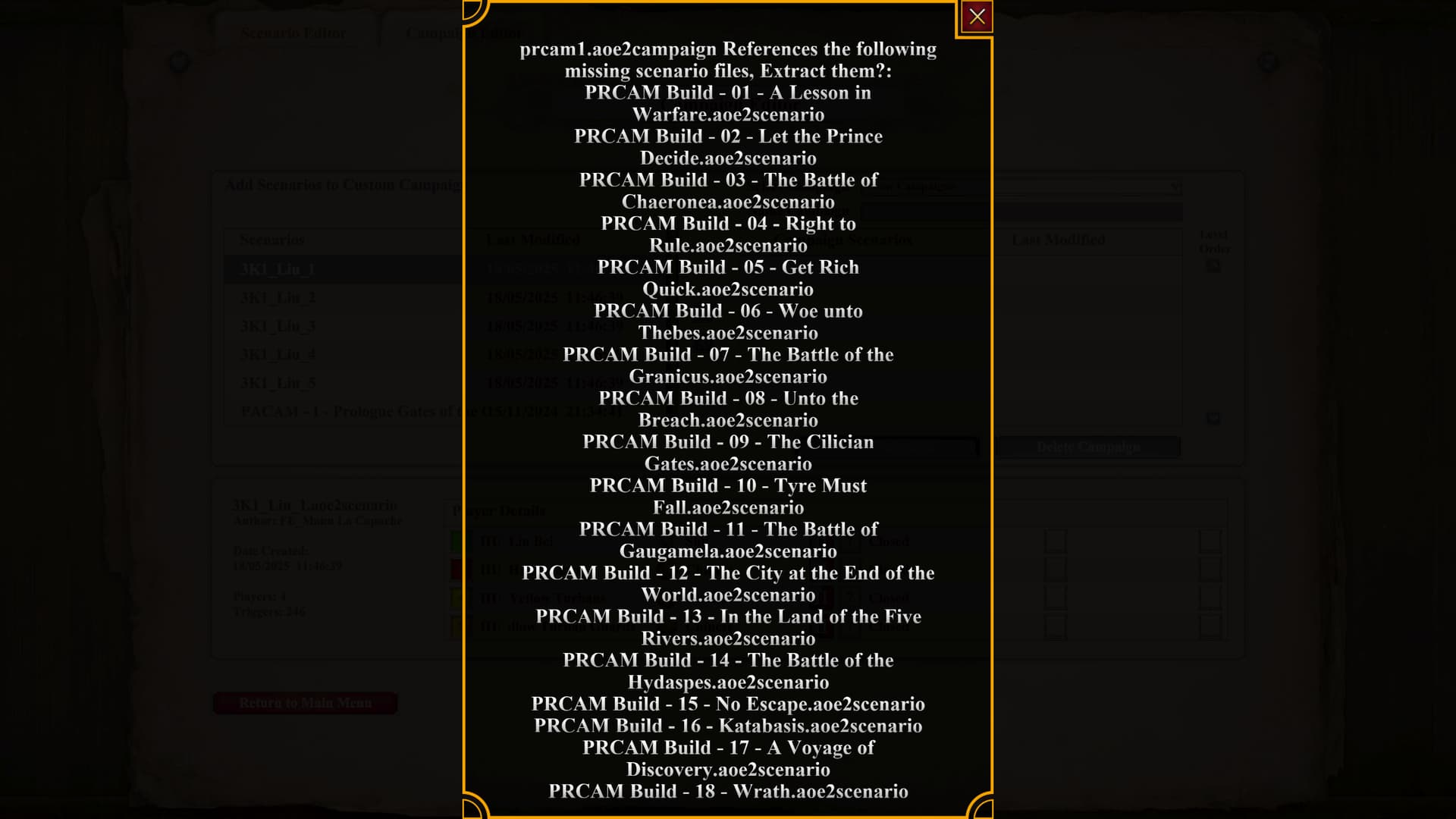
In the Editor → Campaign Editor, if you select a campaign it will offer to extract missing scenario files. This lists the scenarios and provides “Yes” and “No” buttons.
For smaller campaigns (e.g. wecam1) this works fine.
For particularly large campaigns (e.g. prcam1) the list of scenarios to extract is too long and push the “Yes” and “No” buttons off the screen.
This is partly because some scenarios have long file names and take up multiple lines. prcam1 takes up 33 lines to list the scenarios. Manually supplying some scenarios, 31 lines lets the buttons just barely appear.
Changing settings (resolution, in-game HUD, etc) does not seem to affect the number of lines. Nor does windowed mode and resizing that way. The only setting which does affect it is “Sans Serif Font”, but that makes the problem worse.
For reference, I’m using 2560x1440 resolution with no display scaling.
I had submitted a bug report through the bug report form but apparently “due to technical limitations” they were “unable to assist with issues that occur while using the Content Editor”, which I am curious about, but I am following their instructions to post on discord and the community forums for assistance. (Ticket ID 90323)
FREQUENCY OF ISSUE
How often does the issue occur? CHOSE ONE; DELETE THE REST !
- 100% of the time (ALWAYS) (given the same campaign file, it always happens.)
REPRODUCTION STEPS
List CLEAR and DETAILED STEPS we can take to reproduce the issue ourselves… Be descriptiv e!
Here’s the steps to reproduce the issue:
- Attempt to extract a campaign that contains a lot of scenarios or scenarios with long names (for instance,
prcam1.aoe2campaign)
EXPECTED RESULT
What was SUPPOSED to happen if the bug you encountered were not prese nt?
Campaign extraction buttons should be accessible regardless of number of scenarios.

IMAGE
ALWAYS attach a PICTURE (.jpg, .png, .gif) or VIDEO (.mp4, YouTube link) that highlights the prob lem.
GAME FILES (SAVE / RECORDING)
Attach a SAVE GAME (.aoe2spgame) or GAME RECORDING (.aoe2record) of the match where you encountered the issue. Link it below if using an external file ser vice.
- Not Applicable