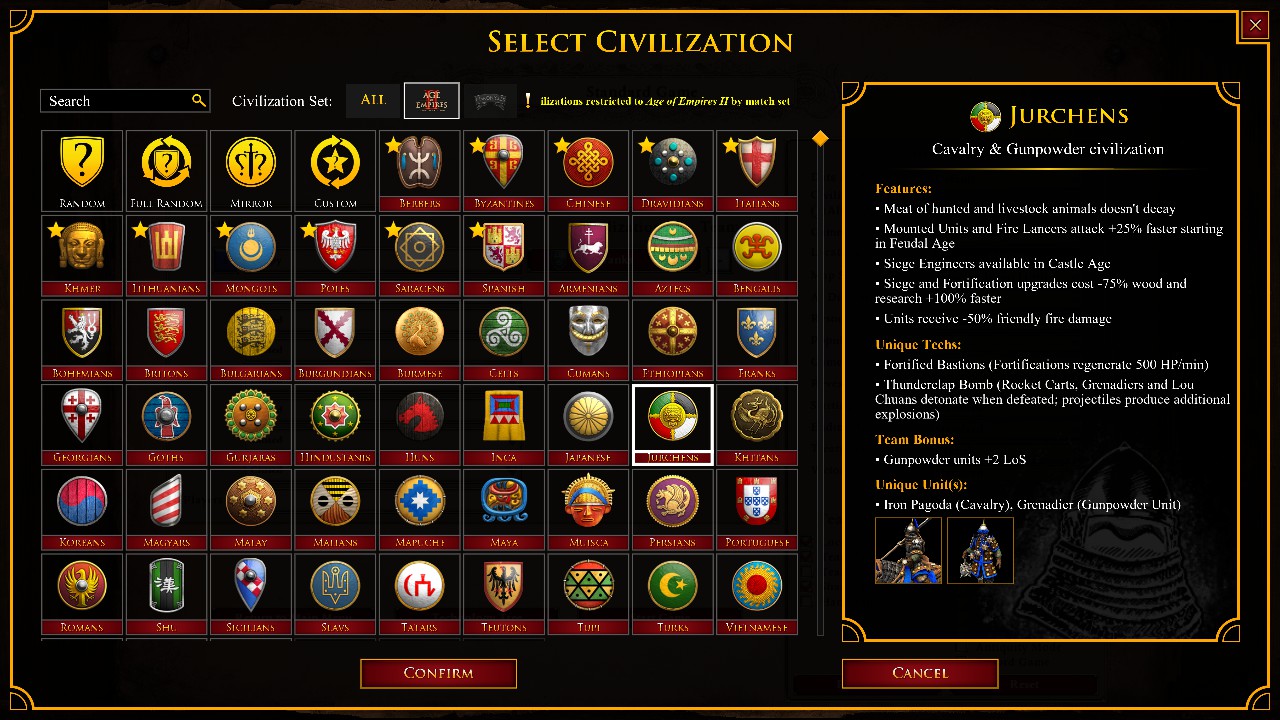
Haven’t played for at least months, but it didnt used to look like this.
With AI suggestions here is a list of things I tried:
- Close the game entirely.
- Right-click Age of Empires II: Definitive Edition in your Steam Library and go to Manage > Browse local files.
- Find the main executable file (
AoE2DE_s.exe). - Right-click it, select Properties, and go to the Compatibility tab.
- Check the box for “Disable Fullscreen Optimizations”.
- Next, click Change high DPI settings at the bottom.
- Check the box for “Override high DPI scaling behavior” and select Application from the dropdown menu. Apply the settings and launch the game.
-
In the game’s main menu, go to Options.
-
Under the Interface
tab, toggle Smooth Serif Font off or on.
-
Under the Graphics tab, toggle Anti-alias Text.
-
Press
Windows Key + Rto open the Run window. -
Type
%userprofile%\Games\Age of Empires 2 DE\and press Enter.
-
Open the folder named with a long string of numbers (your Steam ID).
-
Open the
modsfolder, go tolocal, and manually delete any lingering layout, UI, or text files left behind.
If none of these resolve the rendering issues, run a quick Verify integrity of game files via Steam (Right-click game > Properties > Installed Files) to replace any broken default localized string tables. [1]
I did all that, and it has made 0 difference. Any suggestions?