Issue:
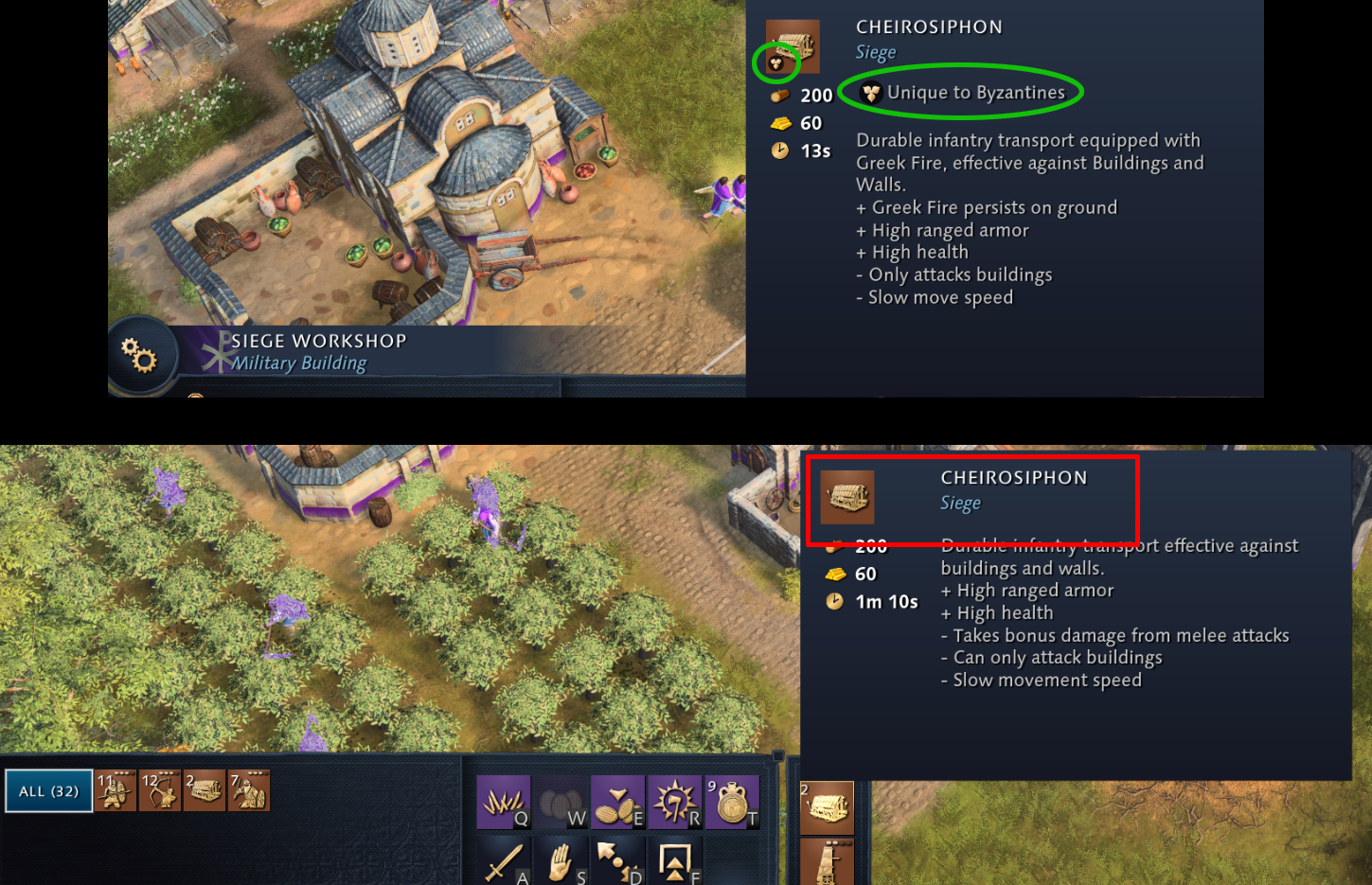
The Cheirosiphon, the unique Byzantine battering ram replacement, is missing its “Unique to Byzantines” tag in the military unit production menu.
In the Siege Workshop panel, Cheirosiphon correctly displays:
-
the unique unit icon,
-
and the “Unique to Byzantines” text tag.
However, in the global military unit production menu (the radial/unit list used to train units), Cheirosiphon:
-
does not show the unique unit icon,
-
does not show the “Unique to Byzantines” text,
-
appears as a generic siege unit.
This creates an inconsistency between the building UI and the global production UI, and may confuse players about whether Cheirosiphon is a unique unit or a generic one.
Repro Steps:
- Start a match as Byzantines.
- Build a Siege Workshop.
- Open the building’s unit panel — observe that Cheirosiphon shows the unique tag.
- Open the global military unit production menu (the one shown in the attached image).
- Locate Cheirosiphon.
- Observe that the unit does not display the “Unique to Byzantines” tag or icon.