 GAME INFORMATION
 These details are CRITICAL; DO NOT skip them or your issue may not be reviewed.
- GAME BUILD #: 101.103.12119.0
- GAME PLATFORM: Steam
- OPERATING SYSTEM: Windows 11
ISSUE EXPERIENCED
DESCRIBE THE ISSUE IN DETAIL (below). LIMIT TO ONE BUG PER THREAD.
FREQUENCY OF ISSUE
How often does the issue occur? CHOSE ONE; DELETE THE REST!
- 100% of the time / matches I play (ALWAYS)
REPRODUCTION STEPS
List CLEAR and DETAILED STEPS we can take to reproduce the issue ourselves… Be descriptive!
Here’s the steps to reproduce the issue:
- Open Kurikara or Saladin 2
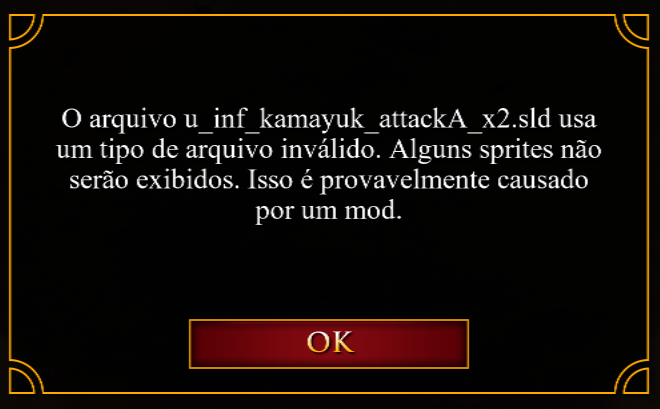
- Get error message
- Entire PC freezes
EXPECTED RESULT
What was SUPPOSED to happen if the bug you encountered were not present?
Being able to play
IMAGE
ALWAYS attach a PICTURE (.jpg, .png, .gif) or VIDEO (.mp4, YouTube link) that highlights the problem.
GAME FILES (SAVE / RECORDING)
Attach a SAVE GAME (.aoe2spgame) or GAME RECORDING (.aoe2record) of the match where you encountered the issue. Link it below if using an external file service.
SP Replay v101.103.12119.0 @2025.05.01 191714.aoe2record (2,7,MB)
It makes Kurikara completely unplayable, but I’ve also gotten these error messages in Saladin 2. The messages say the error might be caused by mods, but the file names make it clear it’s the new elite unit skins.