These details are CRITICAL; DO NOT skip them or your issue may not be reviewed.
**GAME BUILD V100.15.59076.0
**GAME PLATFORM: Steam / Microsoft Store both. Tried both.
**OPERATING SYSTEM: Windows 11
ISSUE EXPERIENCED
I have multiple Issue linked to the same cause I think.
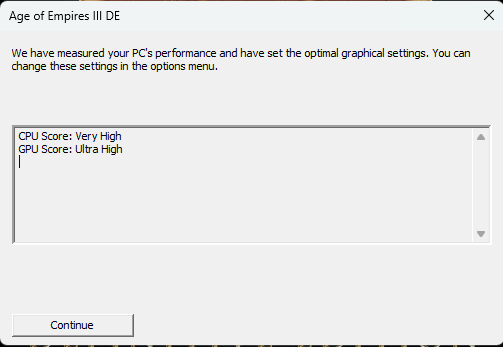
First, when launching the game it waits a bit at the splash screen then, I have each time the pop up saying :
“we have measure your PC’s performance and have set the optimal grapics…”
After tat the game lauches and each time I have the same pop up in the main mene like its the first time. (about new UI and AOE3 DE)
When in the menu the real problems begin, clicking on the skirmish button does nothing. And if I try to create a home city, it crashes the game.
I can launch the first mission of the campain but if I try to save a game I receive a message saying I have insufficient memory space to save.
I investigated and found out what I think may be the root cause. There is no folder AOE3 in my C:User/Document/My Games
I think that this missing folder is the issue since the game cannot save aything and it seems that its launbching itself as for the first time each time.
FREQUENCY OF ISSUE
*How often does the issue occur?
100% of the time / matches I play (ALWAYS)
REPRODUCTION STEPS
Difficult to say, I did nothing in particular while installing the game.
What I already tried :
reinstalling the game (both steam and Microsoft store). WIth and without firewall.
Checking the integrity of the game file.
cheking my version of DirectX
Unfortunately this did not do the trick, I uninstalled and reinstalled on the C drive, ran both steam and the game as admin and encountered the same issue, still no folder in my ‘my game’ folder.
First of all thank you for your reply, I tried without the steam cloud checkeing the read only. Nothing change ad still not seeing anything for AOE3 in C:\Users\diego\Documents\My Games.
You have to disable read only, so uncheck that. Basically I think what is happening is the game can’t create a folder when it starts, for some reason. In my experience, if it wasn’t Steam cloud and your folders (and subfolders) have the “read only” unchecked, could it be you just don’t have enough space on that disk or is it at the very limit?
Another thing could be that your hard drive is somehow locked to writing or reading from certain apps (windows gets weird sometimes)
Yes I checked that it was not on read only, I even tried installing the old AOE 3 and this oe works and write in the folder. I still have 250Go inb my C drive so it isn’t that
It’s like the game is refusing to access and create the required folder. Too bad, I’ll still play a bit around to see if I can find something.
was this resolved ? because i am facing the same problem my version is same as yours but my friend has version 100.15.59076.0 P28.0.1.
AOE says that they have provided all the packs and they asked me to check with steams
Steams says it is not their problem because they have provided the latest version
Confirm that Windows Time is Set to the Appropriate Region & Time Zone
In some instances, if your Windows Time is not accurately set to your current region and time zone, the game may have trouble communicating with the server for updates.
Type “region settings” into the Windows Search Bar and click Enter
Check that the region listed under the country & region dropdown is accurate
Click Date & Time from the left-side navigation menu
Check that your time zone is correctly listed from the dropdown menu
SOLUTION: IT WORKED!
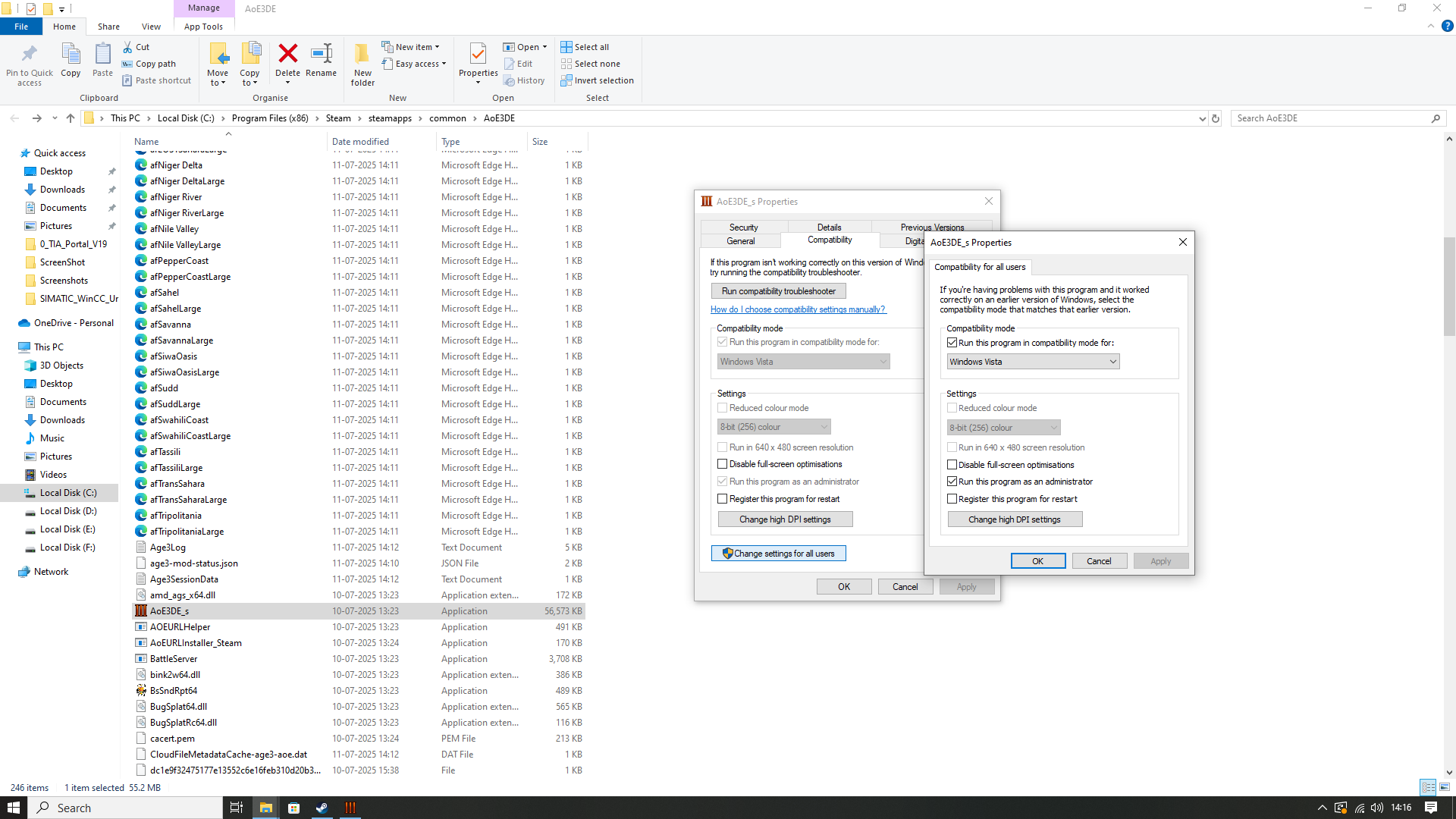
BRO I SOLVED THE PROBLEM! EVERYTHING IS WORKING FINE! JUST RUN USING COMPATIBILITY SETTINGS WITH WINDOWS VISTA AND RUN AS ADMIN.
SKIRMISH MODE AND EVERYTHING IS WORKING FLAWLESS AND THE SAVED FOLDER IS ALSO WORKING WHEN WE CLICK ON OPEN SAVED GAMES FROM LOAD FOLDER.
 GAME INFORMATION
 These details are CRITICAL; DO NOT skip them or your issue may not be reviewed.
 ad still not seeing anything for AOE3 in C:\Users\diego\Documents\My Games.