These details are CRITICAL; DO NOT skip them or your issue may not be reviewed.
GAME BUILD 19: 18658
GAME PLATFORM: Steam
OPERATING SYSTEM: Windows 11
ISSUE EXPERIENCED
DESCRIBE THE ISSUE IN DETAIL (below). LIMIT TO ONE BUG PER THREAD.
The audio of the game is buggy. Sometimes a small part of the background music keeps playing on loop. More importantly, most sounds of the game during play are missing like the building selection sound, unit sounds, unit creation sounds, not enough resources for the unit to be made sound etc. While most of the sounds are missing, those which get played are delayed for like 20-25 seconds making the game very hard to play, like the home city shipment available sound gets delayed or does not come at all. The audio is all over the place.
FREQUENCY OF ISSUE
How often does the issue occur? CHOSE ONE; DELETE THE REST!
100% of the time / matches I play (ALWAYS)
REPRODUCTION STEPS
I don’t know, it just started happening as soon as I installed the patch I think.
EXPECTED RESULT
What was SUPPOSED to happen if the bug you encountered were not present?
The normal audio without delay and without missing any, especially the unit sounds or the in-game sounds. Like how it used to be before the patch, how it is supposed to be.
Can confirm it started happening with yesterday’s patch. I was playing a match right before it, and then one after it was done updating, and I could immediately hear issues of delayed audio.
It only gets worse as you continue a match and by minute 20 or 30 you will only hear erratic musket shots during fights.
edit: I made sure to repair the game and reboot the PC.
Same man. I was playing a game just before the patch dropped, the audio was fine. As soon as I updated the game and started the next match, the audio issues were clear. It’s made the game unplayable for me. I won’t play it until they fix it with a quick hotfix which I hope is soon.
Confirmed. I’ve encountered this issue in several other games, all of which started happening as a result of a major update that also updated the engine under the hood. I don’t remember which engine specifically, but I know Vampire Survivors, of all games, encountered almost the exact same sort of issues I’m seeing here, so I’m guessing AoE3DE uses Unity under the hood?
Anyway, certain sound channels seem to get overloaded and crash and the engine has to manually reset the channel for it to start working again. Almost all non-ambient and non-music sound seems to get sent to the same channel, so it becomes very easy to overload it and cut out almost every sound made, from clicking the UI to battle cries to the voices of AI opponents/allies.
I just had a skirmish match where I couldn’t hear any battle sounds nor the voice lines from either of my AI opponents surrendering. Clicking to move my units gave no sound verification either. After about a minute, the sounds started working again, but by the time the second one tried to surrender, it was broken again. It’s not a fun experience.
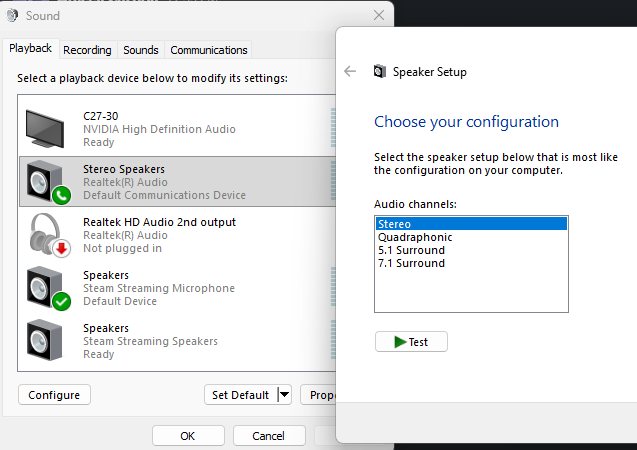
wondering if you had it with specific headset but not another, or with headset but not speakers, after playing campaigns, or mp, or skirmish… every detail helps
Seems like it is very fixable. I hope they do it soon. And same, the battle sounds and the AI taunts were all over the place. The unit sounds were missing or delayed for me and the AI couldn’t complete its taunts cuz it kept looping before finishing it
Here’s a recording showing my case, where the main menu ambience audio plays during a skirmish match despite being set to 0. I managed to make it stop by opening the sound settings while in the skirmish match, but the issue will reoccur when I start a new session.
Sound information from dxdiag:
Sound Devices
-------------
            Description: Speakers (PRO X 2 LIGHTSPEED)
 Default Sound Playback: Yes
 Default Voice Playback: Yes
            Hardware ID: USB\VID_046D&PID_0AF7&REV_0100&MI_00
        Manufacturer ID: N/A
             Product ID: N/A
                   Type: N/A
            Driver Name: USBAUDIO.sys
         Driver Version: 2024.7.60.8851 (English)
      Driver Attributes: Final Retail
      WHQL Logo'd: Yes
          Date and Size: 8/15/2024 3:00:00 AM, 216064 bytes
            Other Files:
        Driver Provider: Logitech
        HW Accel Level: Emulation Only
        Cap Flags: 0xF1F
        Min/Max Sample Rate: 100, 200000
        Static/Strm HW Mix Bufs: 1, 0
        Static/Strm HW 3D Bufs: 0, 0
        HW Memory: 0
        Voice Management: No
        EAX(tm) 2.0 Listen/Src: No, No
        I3DL2(tm) Listen/Src: No, No
        Sensaura(tm) ZoomFX(tm): No
Not sure if relevant, but with poles and the cossack daredevils the gunpowder sound effects are somehow intact? And i heard that musks now get their audio all messed up so idk.
And for the audio reports, i’m on linux; if you want i can give my equivalent for dxdiag.
Maybe interestingly, I don’t get that issue (with ambience audio doing that), but if I enter Skirmish selection and then go back to main menu the skirmish/revolution track skips a couple times and finally leaves the ground to the menu ambience. Actual menu fails to restart most of the time. Just now I tabbed back to the game for it to start but only looping and skipping like a broken record.
I’m also switching home cities and I can already start hearing missing tracks (e.g. missing crowds) and button clicks delays.
I’m on Linux (specifically CachyOS) running the game via Proton. Since Wine just provides a generic audio sink that isn’t tied to any sort of manufacturer’s drivers, the audio issues I’m experiencing are most likely not hardware-dependent and will be a problem on both Linux and Windows. I haven’t noticed the main menu audio getting sent into matches, so idk about that. I’ve only had the SFX audio almost completely cut out during any combat or any other situation where there’s a lot of sounds being generated at once.
Edit: I can also confirm what @Aymen21 said. It’s usually specific types of guns firing that make it through and keep the audio from completely going away. Villagers mining tends to be another one, but none are as prevalent as they should be. I should be hearing more pickaxes hitting and more shots firing than I do, even for the ones that make it through.
 GAME INFORMATION
 These details are CRITICAL; DO NOT skip them or your issue may not be reviewed.