GAME INFORMATION
-
GAME BUILD #: 100.19.18309.0
-
GAME PLATFORM: Steam
-
OPERATING SYSTEM: Windows 10
ISSUE EXPERIENCED
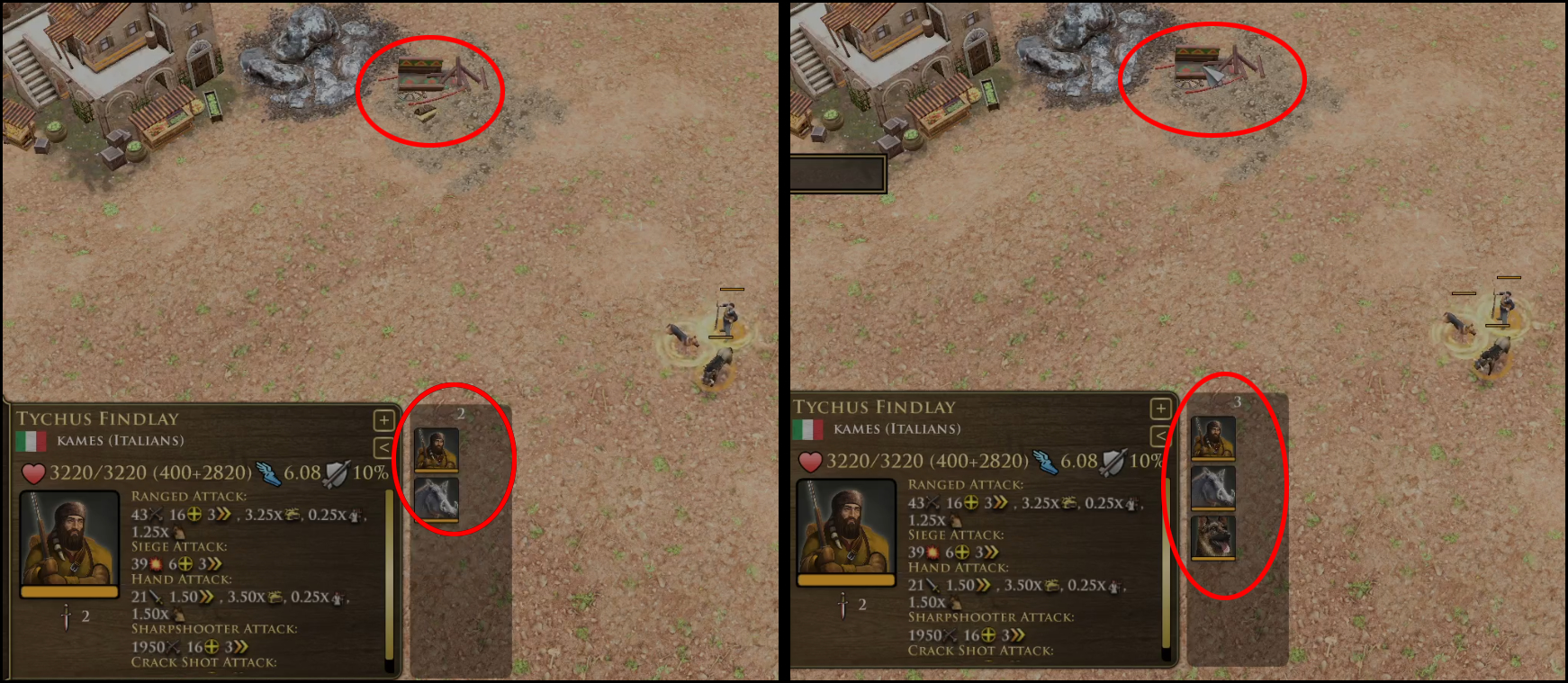
When the “Machiavellianism” Home City card is selected (which grants the Explorer Dog), and a control group is created containing both the Explorer Dog and the default Explorer, the specific Treasure hover cursor/icon is replaced by the default cursor.
This happens when hovering over a Treasure while the combined control group (Explorer + Explorer Dog) is selected. The game acts as if the cursor is not hovering over a Treasure at all, failing to display the specific Treasure interaction UI.
FREQUENCY OF ISSUE
- 100% of the time / matches I play (ALWAYS)
REPRODUCTION STEPS
- Play as the Italians and select the “Machiavellianism” Home City card (ensuring the Explorer Dog is active).
- Select both the default Explorer and the Explorer Dog.
- Create a control group with these two units (e.g., press Ctrl + 1).
- Hover the cursor over any Treasure on the map.
- Observe the cursor/UI indicator.
EXPECTED RESULT
When hovering over a Treasure with units capable of collecting it selected, the game should display the specific Treasure interaction cursor/icon. Instead, it incorrectly displays the default cursor.