 GAME INFORMATION
-
GAME BUILD #: 100.19.18309.0
-
GAME PLATFORM: Steam
-
OPERATING SYSTEM: Windows 10
ISSUE EXPERIENCED
Multiplayer lag remains a major issue. I cannot play a single multiplayer team game smoothly when even one player is experiencing performance problems. If one player starts lagging, every other player begins lagging as well, for as long as that player is affected.
This makes multiplayer team games unreliable, even on powerful hardware and with low graphics settings. The problem has existed since the game’s launch, and I also reported it during the July Open Beta. It is still present in the live version.
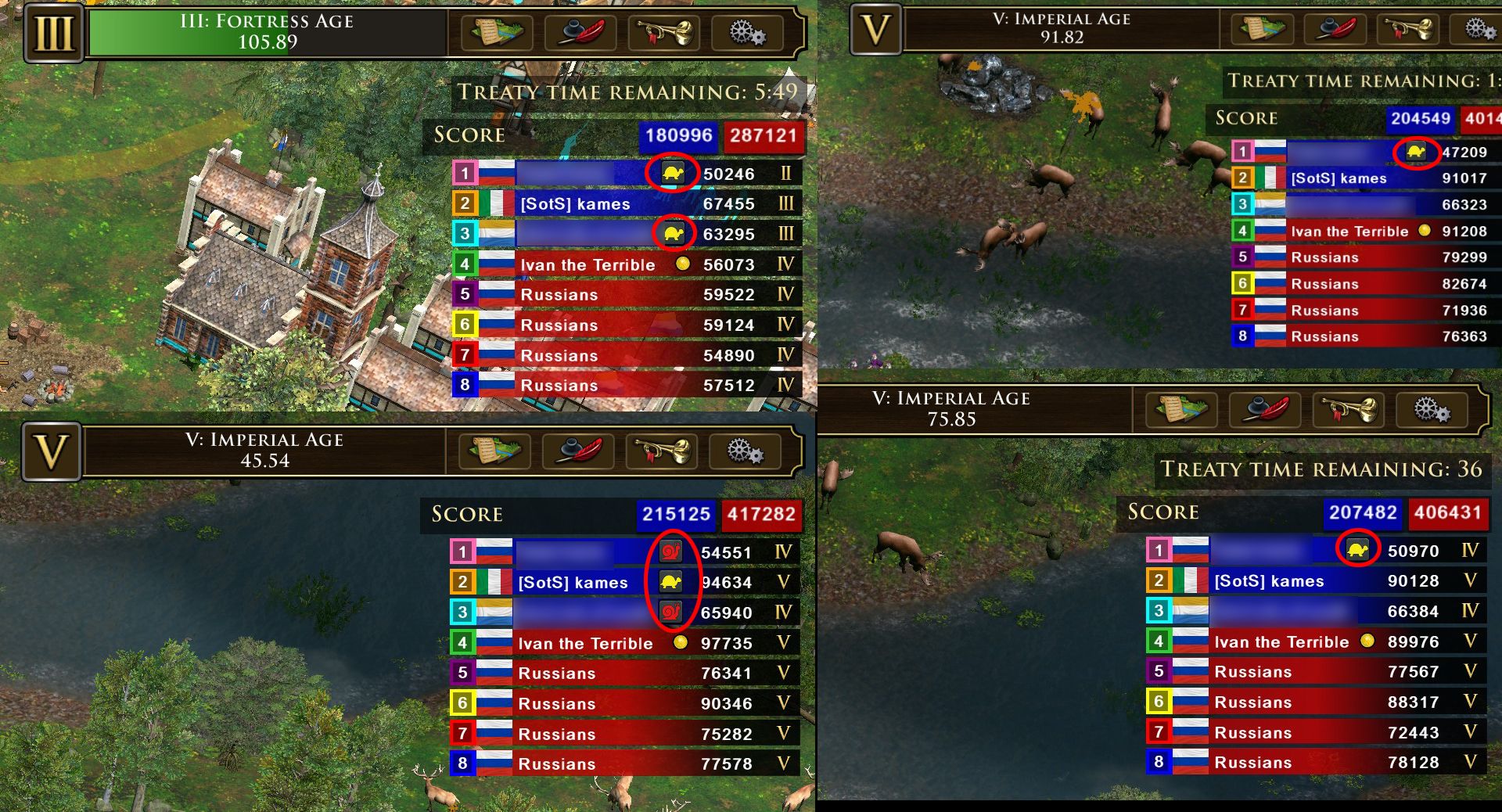
The issue is especially noticeable when players use very different FPS caps. For example, if one player is capped at 30 or 60 FPS while another player is running at 144 FPS or above (300 FPS in my case), the match can begin to slow down when the lower-FPS player cannot keep up. The turtle icon beside a player’s name indicates the affected player.
I have spent hundreds of hours playing and reporting issues in this game, but this core multiplayer-performance problem has still not been resolved. I can play the other Age of Empires games and other modern RTS games without this issue, yet AoE3 multiplayer team games repeatedly suffer from it.
I reported the same problem again during the Open Beta and expected it to be addressed before the DLC launched. It was not fixed, despite the two-month period between the Open Beta and release.
The game’s listed recommended specifications include hardware such as an Intel i5-3300 or GTX 980-class GPU, yet even considerably newer hardware can still experience match-wide slowdowns caused by this behavior.
Previous Open Beta performance report, now private:
https://forums.ageofempires.com/t/severe-frame-rate-loss-in-combat-situations/287874/2
FREQUENCY OF ISSUE
- 100% of the time / matches I play (ALWAYS)
REPRODUCTION STEPS
Here’s the steps to reproduce the issue:
-
Start a Multiplayer team game, such as a 2v2, 3v3, or 4v4 match.
-
Have one player run the game at a substantially lower or unstable frame rate, for example by using a 30 or 60 FPS cap.
-
Have another player run at a higher frame rate, such as 144 FPS or above.
-
Play until the lower-FPS player receives a turtle indicator.
-
Observe that the entire match becomes slow and unresponsive for all players, including those with stable high FPS.
EXPECTED RESULT
A player with low or unstable FPS should not noticeably reduce responsiveness or smoothness for every other player in the match. Multiplayer performance should remain stable for players whose systems and network connections are performing normally.
IMAGE
Screenshot attached showing the turtle indicators beside affected players:
ADDITIONAL PERFORMANCE DATA
I am attaching the performance logs from the most recent match.
DESKTOP-24SB46J-20260925-0207.txt contains 232 ten-second FPS samples. FPS ranged from 22.546 to 259.000, with an average of 102.019 FPS.
-
28 samples were below 60 FPS.
-
106 samples were below 90 FPS.
-
180 samples were below 120 FPS.
Also see support ticket #106690 where additional logs have been attached.
Age3Log.txt (7.2 KB)
Age3SessionData.txt (156 Bytes)
DESKTOP-24SB46J.txt (175 Bytes)
DESKTOP-24SB46J-20260925-0207.txt (8.9 KB)