GAME INFORMATION
 These details are CRITICAL; DO NOT skip them or your issue may not be reviewed.
- **GAME BUILD ACTUAL
- **GAME PLATFORM: Steam
- **OPERATING SYSTEM: Windows 11
ISSUE EXPERIENCED
DESCRIBE THE ISSUE IN DETAIL (below). LIMIT TO ONE BUG PER THREAD.
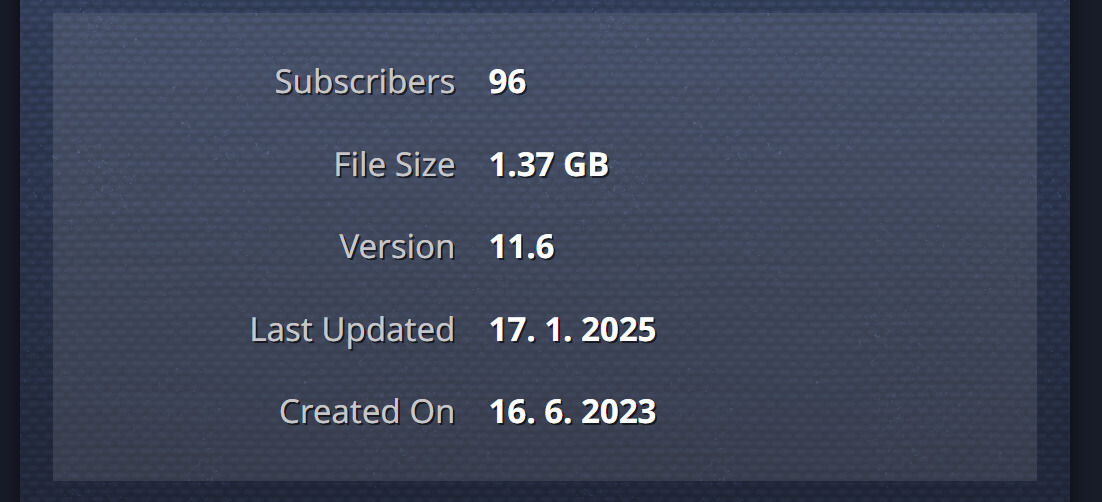
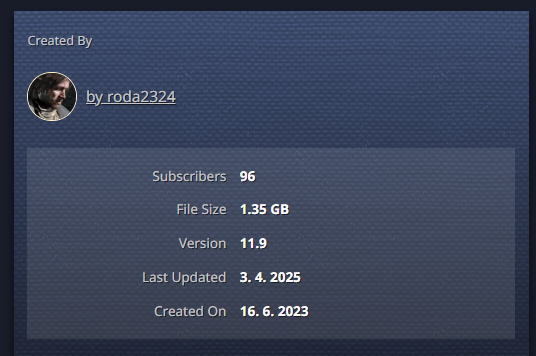
After I successfully uploaded the mod today, the date of the last update is still 01/17/2025: Age of Pirates Beta Test - Mods - Age of Empires
Since then, there have been more mod versions that were working pretty fine. Players report the features from the newest version didn’t appear in the game.
After repeated upload, the issue is still the same: Successful upload but the Last upload is still 01/17/2025
- the mod overview does not show the actual version
- players reported the newest version which was uploaded today is not working and no one knows which mod version is currently there
- when I tried to update the mod from my PC, it showed me I have the most recent version - my last update of the Beta Test mod was later than January 17, so can I have a newer version than it’s officially up?
FREQUENCY OF ISSUE
How often does the issue occur? CHOSE ONE; DELETE THE REST!
- 100% of the time / matches I play (ALWAYS)
REPRODUCTION STEPS
List CLEAR and DETAILED STEPS we can take to reproduce the issue ourselves… Be descriptive!
Here’s the steps to reproduce the issue:
- Try if other mods work fine
- If yes, please check the problem with this specific mod, why the version is not up, even though the upload was successful and there have been many more version since the one which is currently there
EXPECTED RESULT
What was SUPPOSED to happen if the bug you encountered were not present?
- The mod overview is showing real data
- Mod can be downloaded in the most recent version
- Future uploads work without problems
- If there is a problem I see at least a warning, co I can use some support
IMAGE
ALWAYS attach a PICTURE (.jpg, .png, .gif) or VIDEO (.mp4, YouTube link) that highlights the problem.
GAME FILES (SAVE / RECORDING)
Attach a SAVE GAME (.aoe3Ysav) or GAME RECORDING (.aoe3Yrec) of the match where you encountered the issue. Link it below if using an external file service.
Update: After unsubscribing and reinstalling the mod in the game mod manager, the mod is in the newest version. So the correct data is probably there but doesn’t get adequately installed while updating the mod.
@DodoNotDoDo I’ve been told that you could help me with this one. It’s quite critical. We need at least some temporary solution what should we do now? The players have to unsubscribe and subscribe with every update, which is extremely annoying.
I’m not seeing any issues so I’m not quite sure why the date wasn’t updating. That would happen if the publish failed for some reason, but I’m not seeing any indication that it failed.
I went ahead and manually updated the date. The next time you do a publish, check both the version number and last update to see if they update. If not, let me know and I can check the latest logs and dig deeper.
Many thanks for that! I really appreciate your help. I’ll let you know if it works or not. The date was not the main problem itself, but it’s possible that it was causing the other troubles. I hope it will help. Anyway I’ll let you know.
Hey, I did an update yesterday (April 4th), and even though it shows the last update as from April 3rd, which is one day earlier, I think the issue probably still persists. Isn’t there some general problem, that it just doesn’t register any new updates as changes and therefore IT doesn’t change the date thus there is also a problem with the in-game updates, so the new version is not registered as really new.
Thanks for the info. It took a bit more digging, but turned out to be a change to some network routing that was causing the publish request to timeout. I’ve fixed that, so it should work again now.
3 Likes
Dodo for president ! Always so helpfull ! 
3 Likes
Many many thanks again @DodoNotDoDo ! I’ll let you know if everything is all right after the next update!
Hi @DodoNotDoDo, I’ve uploaded a new Beta version, and it looks like the issue is still there. The players are complaining they can’t update the mod…
It failed to publish because it had a couple .fbx files in it, which aren’t an allowed file type. If they’re necessary for your mod, let me know and I can check with the team on Monday to see if I can change it to allow them.
They’re not. I’ll clean the files then. Many thanks! Strangely, I didn’t get any error message,
Issue fixed, many many thanks for such a fast reaction! I highly appreciate it!
1 Like
@DodoNotDoDo Hi, sorry for annoying you again with another issue:
Now the date is correct, but the files are not:
Mod preview:
Code:
53 techs are missing and more content too. This time, I triple-checked if there were no unsupported files. I’ll try to re-upload again.
Since it looks like the Beta is probably completely broken, wouldn’t it be easier to start with a new Beta? It would mean a certain inconvenience for the subscribers, but we don’t have that many since it’s just a test version of the mod…
I tried re-uploading again, but the same issue occurred. I quadruple-checked the presence of FBX files and didn’t find anything…
This time it doesn’t even show the version has been updated, and it’s still showing 12.2
One more update:
I created a NEW separate mod and managed the upload, but Multiplayer does not work for this one:
Two devices have the same mod version, both of which have the most up-to-date one, even though they don’t appear in the MP Game browser.
It looks like due to the large number of images included it timed out waiting for them to be checked before the publish completed. I’ve doubled the wait time which should hopefully address this problem. I also noticed in the original version (169691) the description got truncated due to a bug and that has also now been fixed.
Many thanks! I finally made it work yesterday. So sometimes it works, sometimes doesn’t… So with the next update it should be fine now?
Since the original Beta version works now, can I somehow delete the new one?
Yes, it should hopefully work going forward. And yes, if you go to the My Mods tab on the web site, click the little garbage can icon on the version you want to delete.
Many thanks! It looks like it works now. I’ll let you know if there are any issues.