 GAME INFORMATION
  These details are CRITICAL; DO NOT skip them or your issue may not be reviewed.
GAME BUILD #: 177723 GAME PLATFORM: Steam OPERATING SYSTEM: Windows 11
ISSUE EXPERIENCED DESCRIBE THE ISSUE IN DETAIL (below). LIMIT TO ONE BUG PER THREAD.
Following the installation of Update 177723, the game executable crashes immediately during the launch sequence before the main menu renders. The crash produces a Windows Null Pointer Dereference exception with the following exact text: “AoE2DE_s.exe - Application Error. The instruction at 0x00007FF715219732 referenced memory at 0x0000000000000000. The memory could not be written.” This is a verified memory allocation failure within the updated executable.
FREQUENCY OF ISSUE How often does the issue occur? CHOSE ONE; DELETE THE REST !
100% of the time / matches I play (ALWAYS) Can’t even play a match. Can’t load the game.
REPRODUCTION STEPS List CLEAR and DETAILED STEPS we can take to reproduce the issue ourselves… Be descriptive! Here’s the steps to reproduce the issue:
-
Launch the Steam client.
-
Navigate to Age of Empires II: Definitive Edition.
-
Click ‘Play’.
-
Wait for the initial launch sequence to execute.
-
Observe the application terminating before the main menu loads, immediately followed by the Windows Application Error dialogue box detailing the unwritten memory exception.
EXPECTED RESULT What was SUPPOSED to happen if the bug you encountered were not prese nt?
The executable initializes without memory errors and successfully loads the game client to the main menu.
IMAGE ALWAYS attach a PICTURE (.jpg, .png, .gif) or VIDEO (.mp4, YouTube link) that highlights the problem.
GAME FILES (SAVE / RECORDING) Attach a SAVE GAME (.aoe2spgame) or GAME RECORDING (.aoe2record) of the match where you encountered the issue. Link it below if using an external file ser vice.
N/A - The crash occurs at executable launch. No in-game session can be started, making save file generation impossible.
Thanks for the report @Jessebone we’re already tracking this issue.
New June 2026 patch also slowing everything in the game. screen transitions, lobby loading, game loading, even civ selection page loading takes too much time and sometimes it gets stuck indefinitely.
Tracking an issue is one thing, why aren’t any solutions being offered?
If you’re not going to roll back the update to the most recent stable before this patch, at least provide the option for users to choose the stable version within Steam et al.
This would be a P1 in any serious organisation given it’s their prime product. This feels not treated anywhere near as such.
No sean tan inutiles! Vuelvan a la version anterior de inmediato, mientras arreglan las cagadas que se mandan y no testean como se deben antes de publicar una nueva version. Soy desarrollador , y me dan verguenza como colegas. Tienen a una comunidad, o mucha gente que pago dinero, sin poder disfrutar lo que pagaron.
Personalemte hice todo lo que puede llegar a hacer alguien. Desde reinstalar el juego, hasta reinstalar el windows!! Y nada sirvio! Todos los driver estan al dia, estaba funcionando bien y la cagaron
Cuanto tiempo necesitan para resolver? Mientras arreglan y lanza un nuevo hotfix, vuelvan a la version anterior!! Llevan 2 dias completos, me dan verguenza como colegas developers
Can confirm, I have the same issue, never had a problem launching the game before
Is it possible to roll it back so I can play. I’ve never had issues like this..
What type of hardware are others with this issue using? - Is anyone else on an MSI machine like me?
Can I bet the value of the Chronicles expansion on the pattern?
- Can I win the expansion if this is indeed the failure point?
I actually have found a workaround. On windows, in device manager, I have:
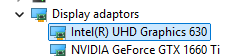
Right click on my Intel UHD Graphics: Disable device
Launch the game
Go back to device manager (once the game has launched), right click on my Intel UHD Graphics: Enable device
Ok so doing the drivers updates through Intel tools actually fix the problem for me.
Procesador Intel(R) Core™ i5-4670K CPU @ 3.40GHz 3.40 GHz
RAM instalada 8,00 GB
Identificador de dispositivo D8E2265F-382C-4C59-BB5B-D4A690A62484
Id. del producto 00330-80000-00000-AA639
Tipo de sistema Sistema operativo de 64 bits, procesador basado en x64
Lápiz y entrada táctil La entrada táctil o manuscrita no está disponible para esta pantalla
Edición Windows 10 Pro
Versión 22H2
Instalado el 2/6/2026
Compilación del sistema operativo 19045.3803
Experiencia Windows Feature Experience Pack 1000.19053.1000.0
Grafica MSI GTX 970
Hi, everyone, same issue on my mother’s PC, it was working before the update, now it just crashes after clicking “Play” on Steam
This worked for me. Thanks for sharing!
I can’t play start the game anymore either. it crashes right away.
dang, that didn’t work for me (mine is only Intel (R) Graphics)
roll back please please!!!
Same here, the game is slow to start, slow to enter a game (ranked or single player), slow to open the civ choice menu, laggy in the games. Please fix it, thanks!
I got it working again.
Steps i took:
Reformat SDD, hard (destructive) windows 11 reinstall, steam reinstall, aoe2DE reinstall.
Things that were immediately different when playing again:
- Skipintro removed (did not break when reenabled)
- Mods removed (and no longer available): range view mod, monk pointer, a boar label, and others. I reenabled ONLY a “large visible relic” mod. Small trees was there but that and the range thing are a setting now. No mod needed.
- Graphics changed to higher quality (i have them set low and it looks classic)
- Enhanced graphics pack off (it may have been off already)
Idk what the cause was. . But it loads and plays now!


