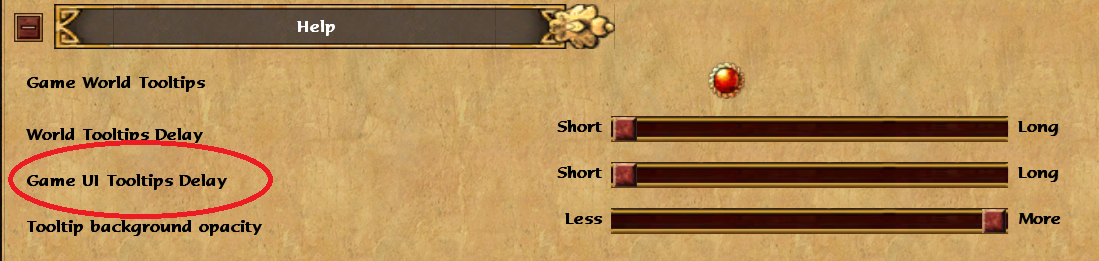
Mostly posting this to help people who are looking for this option too, since I couldn’t find anyone talking about it, but the latest current version of DE is missing this option that legacy(and previous versions of DE) had,
Legacy:
DE:
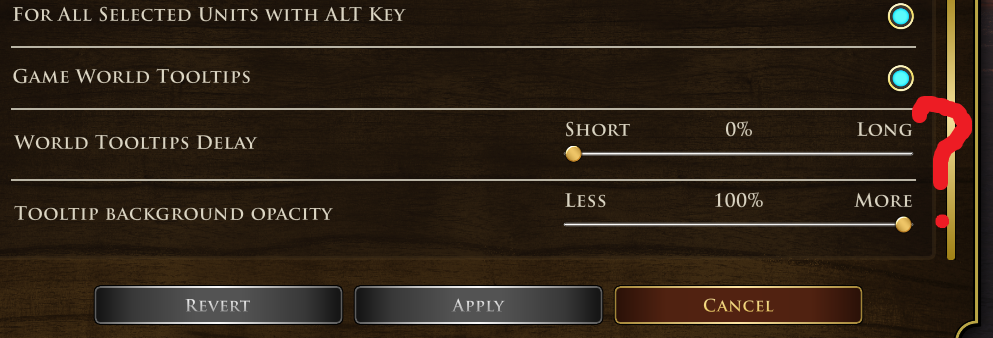
I’m not sure when this got removed, as I remember having this option set to 0 on an old install, but upon reinstalling there is a default delay that cannot be switched to 0 in the default UI. And if you’re OCD about your settings like me, it has probably been driving you insane.
Here’s how to change it manually(or at least what worked for me):
Go to:
(C:) /Users /your user profile /Games /Age of Empires 3 DE /76561124123(really long string of #s) /Users /UserProfile.xml
Open UserProfile.xml with notepad or your text editor of choice, scroll down to:
setting name=“optiontooltipgameuidisptime”>500.000000

change the “500” to “0”

Save the file, restart your game, and UI tooltips should come up immediately on mouseover
Still think this deserves an official fix for the default UI as it’s a setting I’ve been using for years and really threw me off when I started a fresh install of this game on a new pc(thus resetting my UserProfile.xml file)