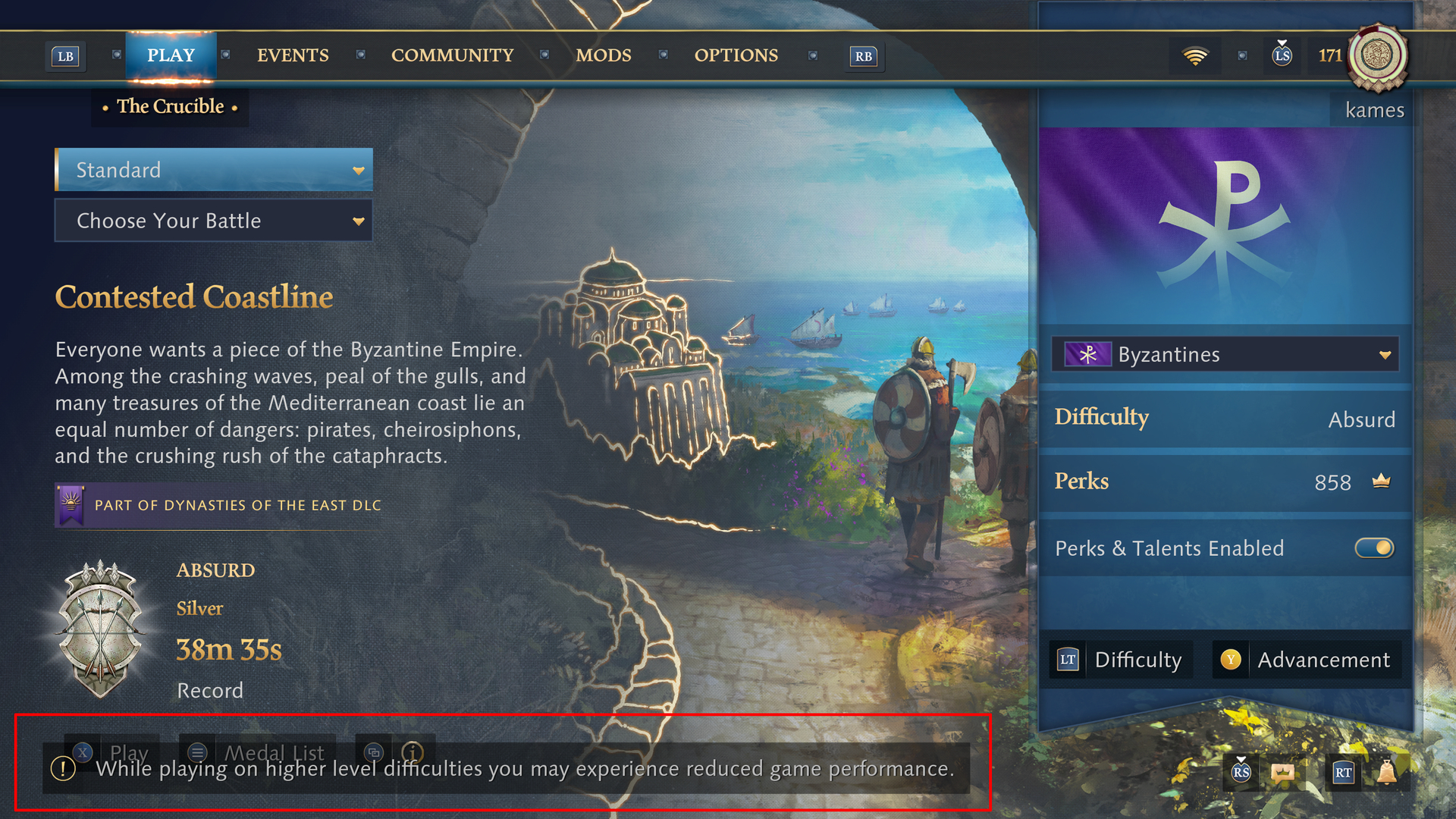
Issue:
In The Crucible (Solo) lobby, the informational tip displayed at the bottom of the screen overlaps with the menu buttons in the controller interface. The message partially covers the buttons and their associated icons, making the menu elements difficult to see clearly.
This issue occurs only when using the controller interface and is not present in Crucible Co-op.
Trigger Event:
Entering The Crucible (Solo) lobby, where the informational tip is displayed continuously at the bottom of the screen.
Repro Steps:
- Boot the game.
- Wait for the main menu to load.
- Enter The Crucible (Solo).
- Wait for the lobby to load.
- Observe the informational tip displayed at the bottom of the screen overlapping with the menu buttons in the controller interface.
Expected Result:
The informational tip should be properly positioned without overlapping or obscuring the menu buttons and their associated icons in the controller interface.