 GAME INFORMATION
 These details are CRITICAL; DO NOT skip them or your issue may not be reviewed.
- GAME BUILD #: ver 101.103.46651.0 (#177723) 23520824
- GAME PLATFORM: Steam
- OPERATING SYSTEM: Windows 11
ISSUE EXPERIENCED
DESCRIBE THE ISSUE IN DETAIL (below). LIMIT TO ONE BUG PER THREAD.
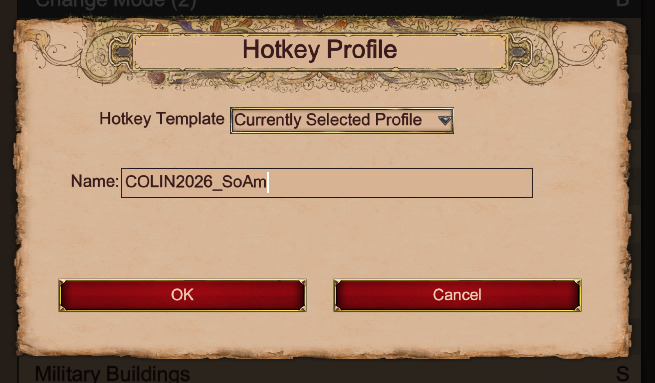
When pressing the add profile button next to the hotkey profile drop-down menu, there is the option to use the Currently Selected Profile as the Hotkey Template. I input a new name for the new template and end up with all of the hotkeys set to ???. The hotkeys are not being copied over to the new profile.
FREQUENCY OF ISSUE
How often does the issue occur? CHOSE ONE; DELETE THE REST !
- 100% of the time / matches I play (ALWAYS)
REPRODUCTION STEPS
List CLEAR and DETAILED STEPS we can take to reproduce the issue ourselves… Be descriptiv e!
Here’s the steps to reproduce the issue:
-
Have a hotkey profile.
-
Click the plus icon next to Hotkey Profile drop-down menu.
-
Set the Hotkey Template drop-down menu to Currently Selected Profile and create a name for the new template.
-
Observe that none of the hotkeys are carried over.
EXPECTED RESULT
What was SUPPOSED to happen if the bug you encountered were not prese nt?
I expected that all of the hotkeys in the currently selected profile would be carried over to the new profile and I could make edits for settlements for when I’m playing South American civs to replace my lumber camp hotkey, while maintaining all of the other hotkeys.
IMAGE
ALWAYS attach a PICTURE (.jpg, .png, .gif) or VIDEO (.mp4, YouTube link) that highlights the prob lem.
GAME FILES (SAVE / RECORDING)
Attach a SAVE GAME (.aoe2spgame) or GAME RECORDING (.aoe2record) of the match where you encountered the issue. Link it below if using an external file ser vice.