 GAME INFORMATION
 These details are CRITICAL; DO NOT skip them or your issue may not be reviewed.
- GAME BUILD #: 169652
- GAME PLATFORM: Steam
- OPERATING SYSTEM: Windows 11
ISSUE EXPERIENCED
DESCRIBE THE ISSUE IN DETAIL (below). LIMIT TO ONE BUG PER THREAD.
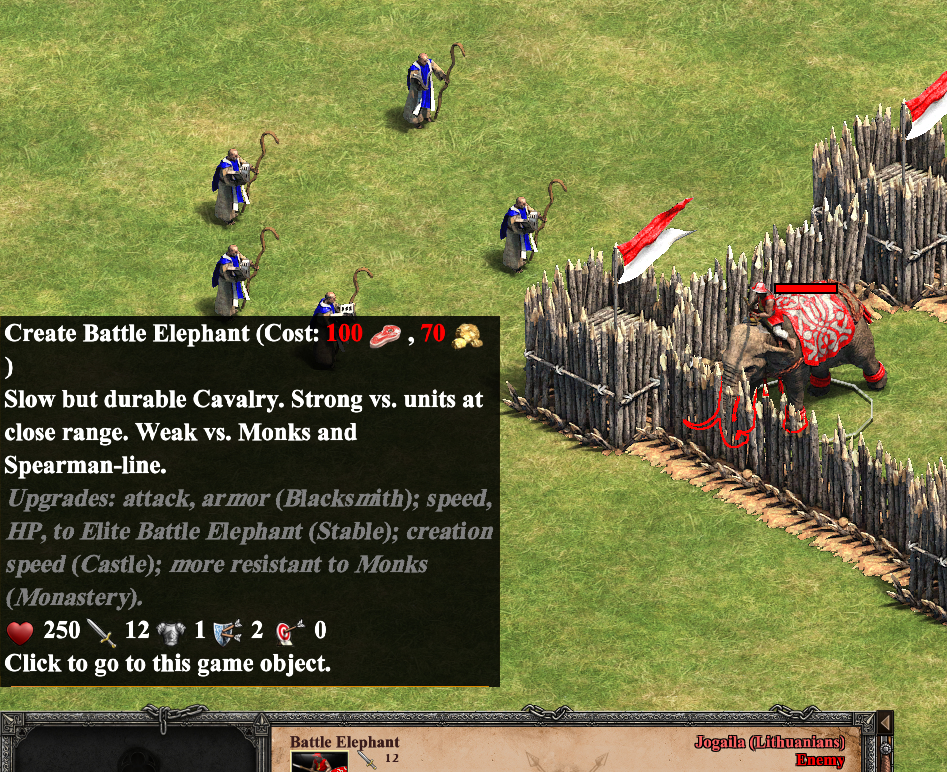
When extended tooltips are enabled, one can read a unit’s description (if it has one) by hovering over its icon after selecting it. Works for both the own and other players’ units. But a unit’s description is gone after converting it.
FREQUENCY OF ISSUE
How often does the issue occur? CHOSE ONE; DELETE THE REST!
- 100% of the time / matches I play (ALWAYS)
REPRODUCTION STEPS
List CLEAR and DETAILED STEPS we can take to reproduce the issue ourselves… Be descriptive!
Here’s the steps to reproduce the issue:
- Enable extened tooltips, if not enabled yet.
- Open the Scenario Edtior and place some Monks (Player 1) and an enemy unit (with description, e.g. Battle Elephant) they can convert. Block the enemy’s movement with its own Palisade Walls. Add an Invisible Object for the enemy player as well, to prevent the AI’s defeat after conversion.
- Test the scenario, order the Monks to convert the enemy unit. Right after that, select the enemy unit and view its description by hovering over its icon. Don’t move the mouse pointer until the conversion is complete.
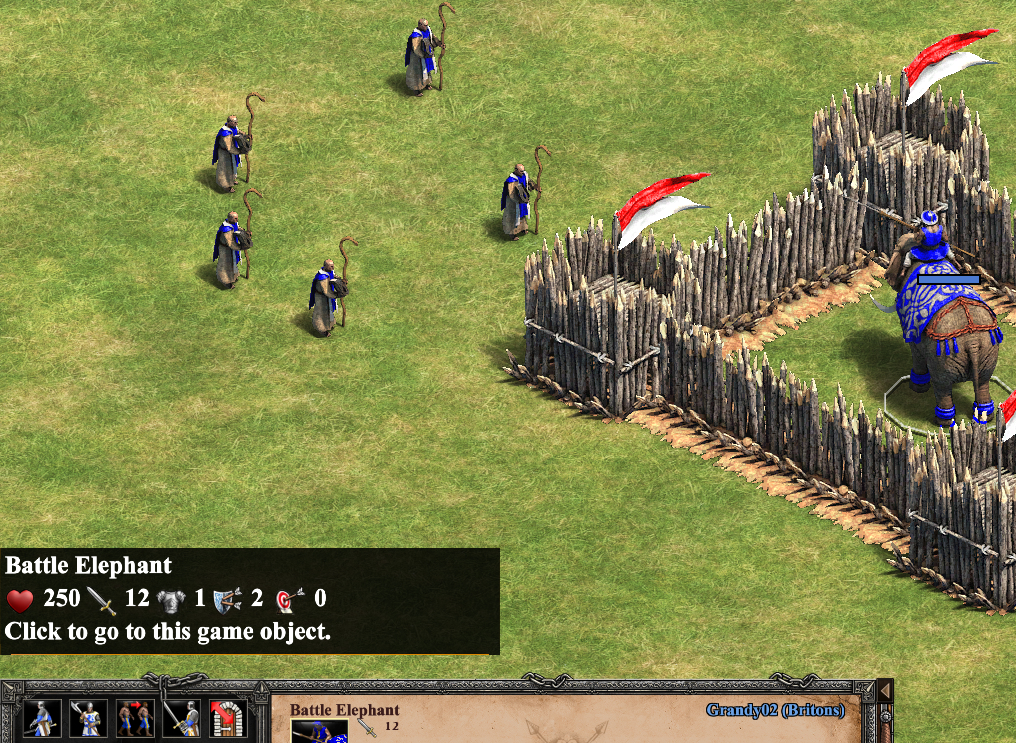
- Once the unit is converted to your side, the description disappears. Only the unit’s name and stats remain available.
EXPECTED RESULT
What was SUPPOSED to happen if the bug you encountered were not present?
A unit’s description should still be accesible after it changed sides.
This also happens for units converted via triggers and Gaia units that are automatically converted.
IMAGE
ALWAYS attach a PICTURE (.jpg, .png, .gif) or VIDEO (.mp4, YouTube link) that highlights the problem.
Viewing an enemy Battle Elephant’s description before its conversion:
The moment it becomes my unit, the description disappears, save for the name and stats:
GAME FILES (SAVE / RECORDING)
Attach a SAVE GAME (.aoe2spgame) or GAME RECORDING (.aoe2record) of the match where you encountered the issue. Link it below if using an external file service.