 GAME INFORMATION
- GAME BUILD #: 177723 (June 2, 2026 update — cannot open the game to read the exact string, see below)
- GAME PLATFORM: Steam
- OPERATING SYSTEM: Windows 10
ISSUE EXPERIENCED
After Update 177723 (June 2, 2026) the game no longer launches. When I press Play in
Steam, AoE2DE_s.exe starts and exits within ~1 second: no window, no splash screen, no
error dialog. This is a REGRESSION — the game ran perfectly (a 4-hour session) on this
exact PC on May 25, 2026, and broke the moment I installed 177723. I am one of 300+
users reporting the same in the Steam megathread.
Diagnostic details:
- The profile log folder is created but stays at 0 bytes.
- No Application Error (Event ID 1000) in Windows Event Viewer.
- I enabled WER LocalDumps via registry: NO dump is generated for the launch failure.
- Running AoE2DE_s.exe directly (steam_appid.txt present) exits with code 100 (0x64).
- BugSplat appears to intercept the failure (clean exit, no WER dump), so no local crash
report is produced for the launch itself.
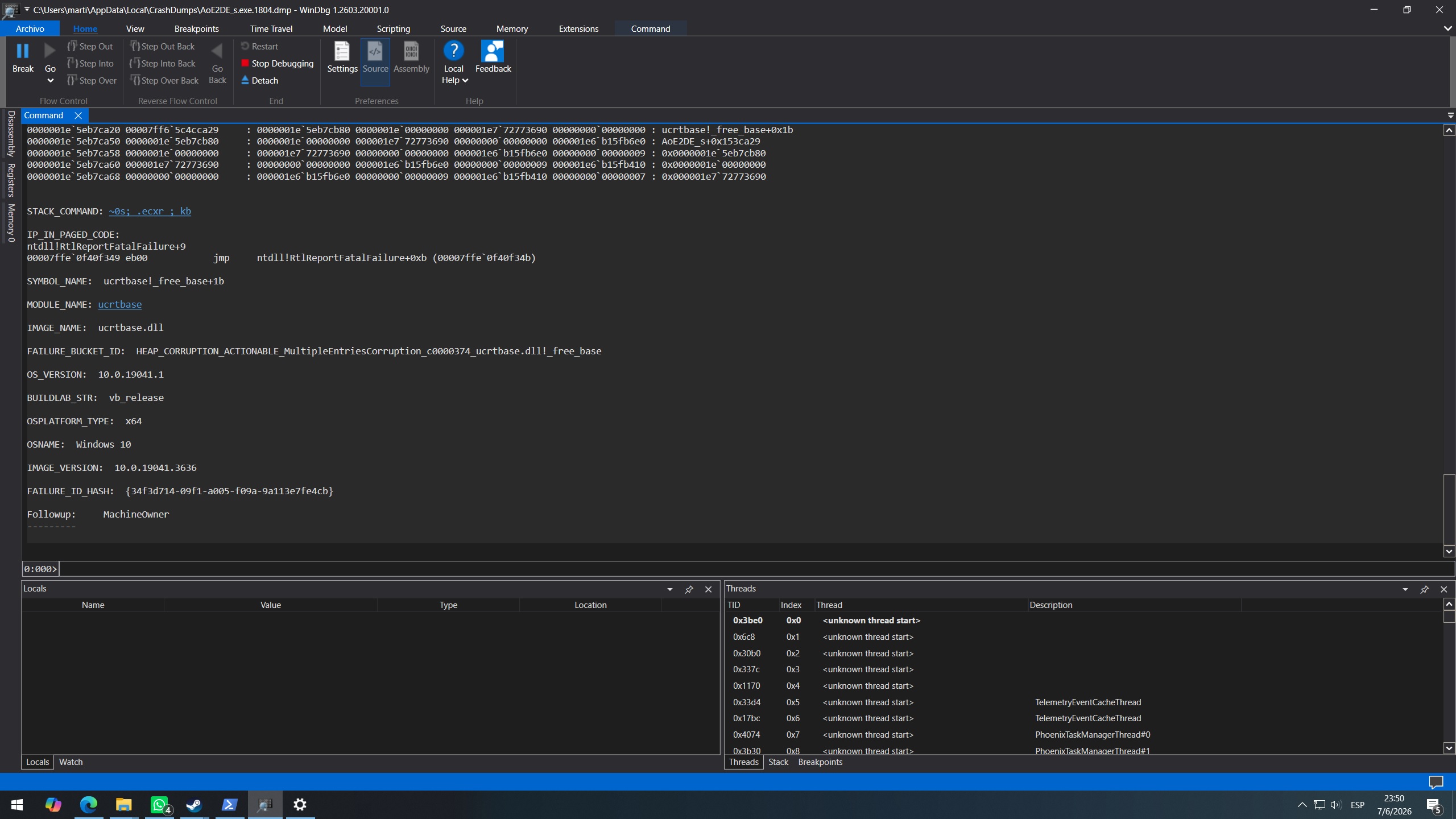
Proof the game worked on this exact hardware/OS before the patch — a pre-patch crash dump
from an in-game session (a separate, heap-related crash) shows the game launched and ran
for ~4 hours:
- File: %LOCALAPPDATA%\CrashDumps\AoE2DE_s.exe.1804.dmp
- Date: 2026-05-25 17:54 | Process uptime at crash: 3h 51m 57s
- Game version (from dump): 101.103.44206.0
- Exception: 0xc0000374 (heap corruption), module ucrtbase!_free_base
- Bucket: HEAP_CORRUPTION_ACTIONABLE_MultipleEntriesCorruption_c0000374_ucrtbase.dll!_free_base
(I include this only as evidence the install/hardware launches and runs the game; the
LAUNCH failure began only after 177723 and produces no dump at all.)
SYSTEM:
- CPU: Intel Core i5-4670K @ 3.40GHz
- GPU: MSI GeForce GTX 970 (clean driver reinstall via DDU, latest available)
- RAM: 8 GB
- OS: Windows 10 Pro 22H2, build 19045 (fully updated, ESU enrolled)
Already tried (please don’t re-suggest): file integrity verify; clean NVIDIA driver
(DDU + clean install); forced dedicated GPU / High Performance for the exe; disabled
Intel HD 4600 iGPU in Device Manager; latest VC++ 2015–2022 x64 + x86 (fresh) and repair;
run as administrator; Windows fully updated; reinstalled Gaming Services + Xbox Identity
Provider; re-enabled Xbox Game Bar; removed all mods (online + local); disabled all
overlays (Steam, NVIDIA App); no RTSS/Afterburner installed; KB5089573 not installed;
Defender real-time + controlled folder access off; clean boot (all non-MS services +
startup disabled) still fails; no third-party anti-cheat drivers (clean Windows ~3 weeks
old); renamed user profile folder to force clean rewrite.
FREQUENCY OF ISSUE
- 100% of the time / matches I play (ALWAYS)
REPRODUCTION STEPS
Here’s the steps to reproduce the issue:
- On Steam, have AoE2DE updated to build 177723.
- Press Play (or run AoE2DE_s.exe directly from the install folder).
- The process starts and exits within ~1 second — no window, no menu, no error dialog.
EXPECTED RESULT
The game should launch to the main menu as it did before Update 177723 (it worked fine
on this same PC on May 25, 2026).
IMAGE
[attach image — see note below]
GAME FILES (SAVE / RECORDING)
N/A — the game never launches, so there is no save or recording. I can provide the .dmp
file above and a DxDiag on request.
 Symptoms
 The Cause
 How to Fix It (Step-by-Step)