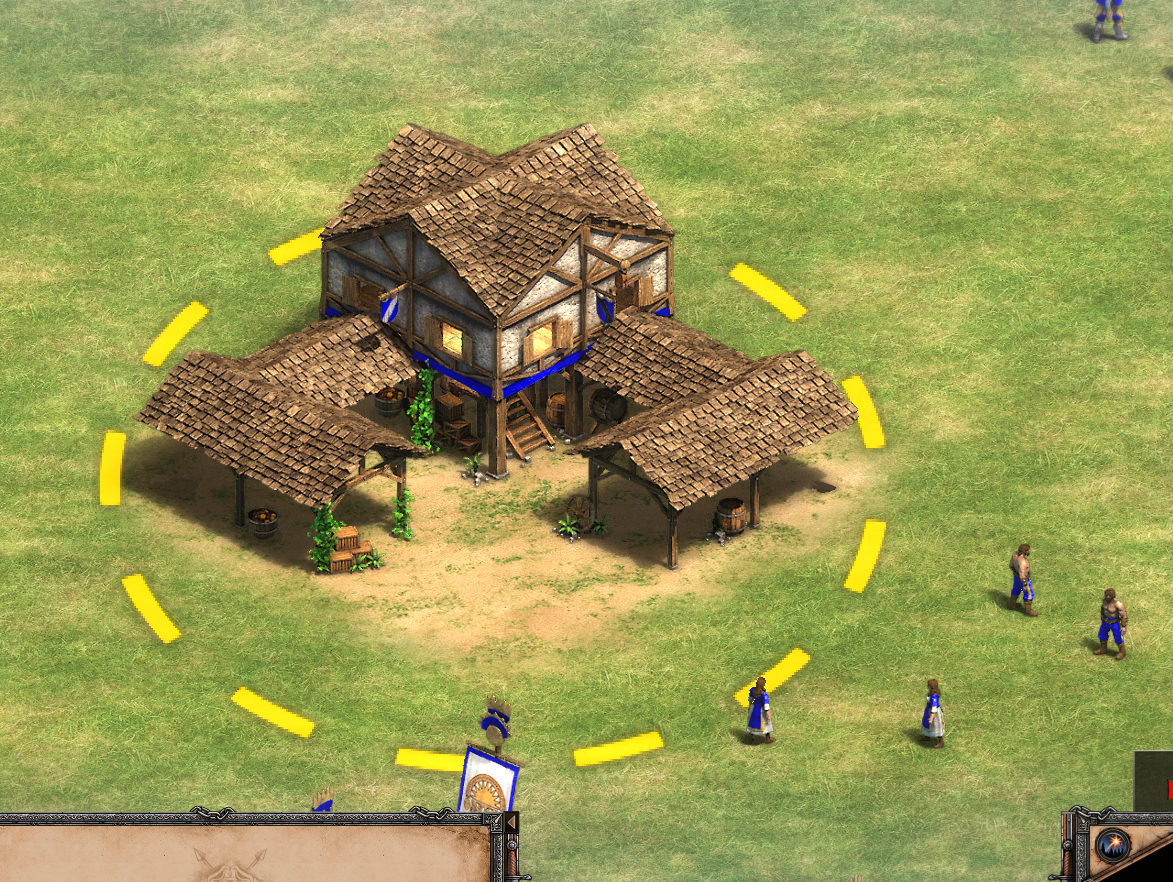
I have seen scenarios of the new campaigns such as Alejandro’s campaign where a text appears in the main tents or in the latest DLC of South American civilizations where in some towers they have a round silhouette.


How could I do this?
I have seen scenarios of the new campaigns such as Alejandro’s campaign where a text appears in the main tents or in the latest DLC of South American civilizations where in some towers they have a round silhouette.
How could I do this?
In the Scenario Editor, you can use the “Caption“ Button. (IIRC, it’s on the… Terrain/Objects Tab? I forget which at the moment.) Write the text you want and then click the building. (There is also triggers with Captions as well.) Just note that ‘currently’, the object needs to exist on the map for captions to work. Also, there is some limitations on what does/doesn’t work. (Buildings generally work though.)
Thank you, I was able to put a caption.
But now how can I put a circle around a unit or buildings?
The circles, or points of interests, are particle effects with graphic IDs 9532 to 9547. In Genie Editor, you can see the type of PoI behind each ID:
There are no objects in the dataset using these graphics as far as I know, so you have to use a trigger with Modify Attribute effect. For example, you could select the object Flag A for Gaia and give it Standing Graphic 9532, then all of Gaia’s Flag A objects will appear as a small white circle. You can use Create Object and Remove Object effects to make them appear and disappear wherever you want. Instead of Gaia, you can also modify the object for Player 1, so that Player 1 will benefit from its Line of Sight.
I don’t know if the devs also did it that way or if they used a more elegant method, but it should work.
Thank you very much, it worked
I just wanted to ask one last thing since I opened a thread and no one answered.
In the first scenario of the Tupies, you have to take care of some carts. Those carts are always visible
How can I make a unit always visible?
I want certain enemy AI units to be visible, even when they are retrained. I imagine it’s with an attribute but I don’t know which one
Could you please help me?
In the scenario you mentioned, I think the carts are always visible simply because they belong to an allied faction and their LoS is shared with the other allies.
To make a certain type of enemy unit visible, there is a resource called “Unit Reveal”. Create a Modify Resource effect, select Unit Reveal and enter the unit’s ID as the value, for example 25 for (Elite) Teutonic Knight. Then Teutonic Knights of every other player will be visible for a moment after being trained. Anything placed beforehand in the editor is unaffected, it has to be trained/built during the game.
For permanent reveal, use a negative value instead, e.g. -25. Well, that’s how it should work, but…
…while permanent display works fine for buildings, it’s bugged for moving objects. So, when the unit moves away, it will disappear in the fog of war, but you might still see how it moves, because its LoS is visible to you, but nonetheless under the fog of war.
That’s all I know about it, sorry. Maybe the devs could fix this…
EDIT: In addition to Modify Resource, you can change the unit’s Fog Visibility via Modify Attribute to 1 (always visible). The fog won’t go away, but at least the sprite will be visible.
If true, I tried that option and only the buildings become visible the movable units do not
Here’s a simple scenario demonstrating it:
Unit Reveal test.aoe2scenario (12.6 KB)
Set difficulty to Extreme, test the scenario and use the “aegis” cheat code, you will see TKs moving around with their LoS in the fog war. But it’s just too bugged to be really useful. For example, move a Cobra Car close to a group of TKs, the fog around the TKs will flicker, maybe even your unit will be covered by fog.
I assume they simply didn’t think of using this for moving objects.
For units existing from the start, you could use movable map revealers following each one, but that will not work for units trained during the game, of course.
Thanks for the stage.
I’ve seen how it works.
Unfortunately it has a limitation: units with ID’s above 900 are shown by adding 900 + the class number of the unit. for example, if I want them to be visible, the Serjeant does not work, if I put “-1658” I have to put “906” since it belongs to the class “infantry” which is class “6” that is, not only the Serjeant would be shown, but all types of infantry
Even worse, in my case: I have worked on a mod where I have created custom heroes and in a specific scenario when researching a “blank technology” I wanted those enemy heroes to be shown.
Even so, thank you very much for the information, it is very much appreciated
Chronicle method to do so was to have the cart garrisonned with an invisible object inside. Then with a looping trigger, it unloaded the unit, this unit was killed by the trigger then, and that same unit had a “blood unit” (unit to spawn upon dying) that was a Flare.
You can use the same method to create an unclickable-unselectable-unattackable unit for your player inside an ally cart. Then you unload it, and kill it. In his “blood unit” just put a temporary map revealer that auto-decay, can’t recall the name of the object but I know a temporary revealer exists.
If you can’t find the revealer, just spawn a regular one, and then at the loop start point you just do a cleaning of all revealer in the cart path / area so you’re not overcharging memeory for nothing.
If you’re looking for object visibility under the Fog, then it’s a specific attribut that determine if object is dissappearing under the Fog of War or if it’s always visible as the Deers are, so study both a regular unit and a huntable unit to see what value you’ll have to set on the object you want to keep always visible.