These details are CRITICAL; DO NOT skip them or your issue may not be reviewed.
GAME BUILD #: 147949
GAME PLATFORM: Microsoft Store
OPERATING SYSTEM: Windows 10
ISSUE EXPERIENCED
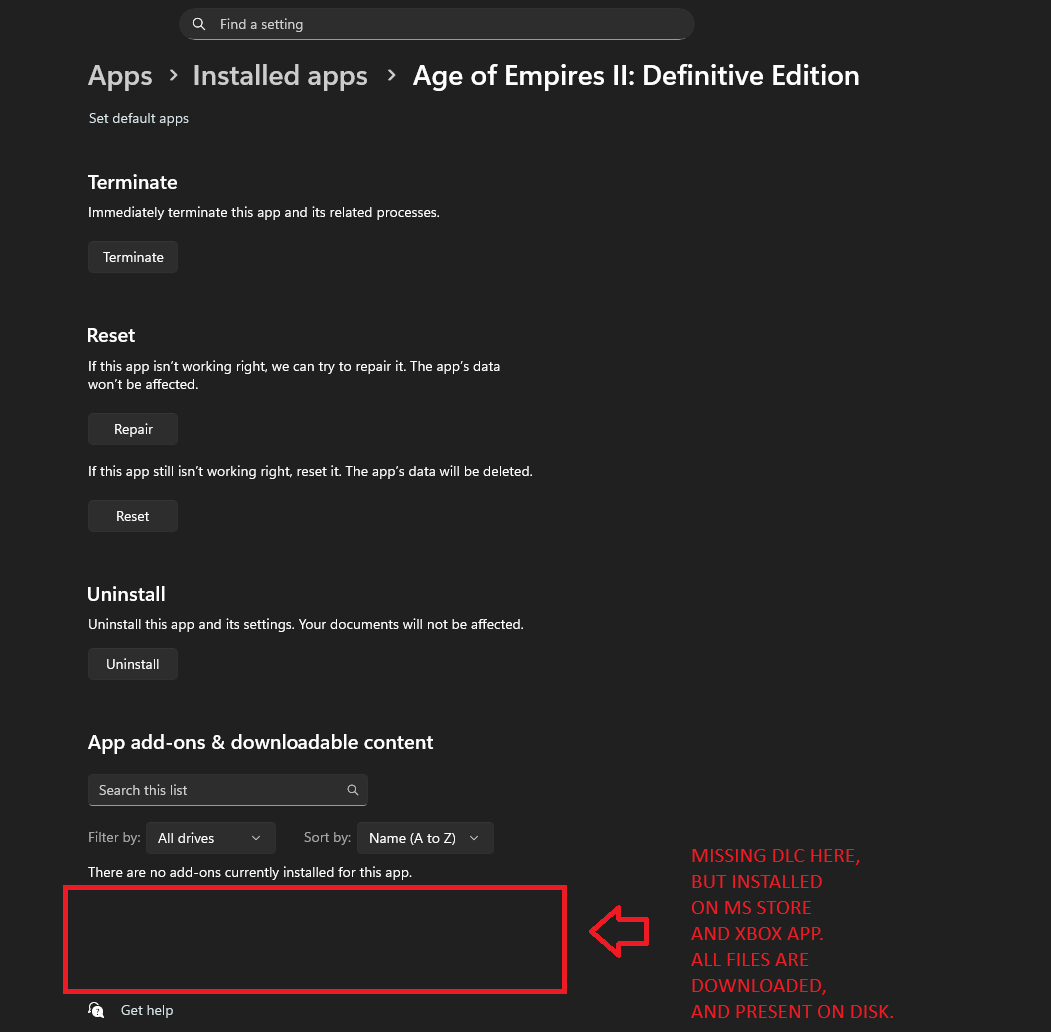
I just formatted, installed the operating system, updated, and installed all the drivers to the latest version, but unfortunately, even though the DLCs are correctly downloaded in-game, they don’t appear as installed. This happens with any DLC, even the graphical ones.
I’ve tried moving the game, uninstalling and redownloading, verifying the integrity of the files, logging out of my Xbox and Microsoft Store account, etc., but I can’t seem to resolve the issue.
FREQUENCY OF ISSUE
How often does the issue occur? CHOSE ONE; DELETE THE REST!
100% of the time / matches I play (ALWAYS)
REPRODUCTION STEPS
List CLEAR and DETAILED STEPS we can take to reproduce the issue ourselves… Be descriptive!
Here’s the steps to reproduce the issue:
Start game
Go in to the main menu
EXPECTED RESULT
Playing with DLC
IMAGE
ALWAYS attach a PICTURE (.jpg, .png, .gif) or VIDEO (.mp4, YouTube link) that highlights the problem.
thanks for pointing that out! I have the exact same issue! I’m also playing the PC Gamepass version. I purchased the full game time ago.
I also purchased DLCs Ilike Return of Rome and The Mountain Royals, etc. They show an arrow pointing down and when I click it the game tells me that I have to install said add-on in order to play it.
The DLC I don’t have shows a padlock icon, but the DLC I paid for can’t be played.
Still playing the rest of the campaigns but I really want to play the DLC I purchased.
The high res textures pack has the same problem. Uninstalling and reinstalling the game did nothing for me.
This is the game I play the most nowadays and it’s painful not having access to that content.
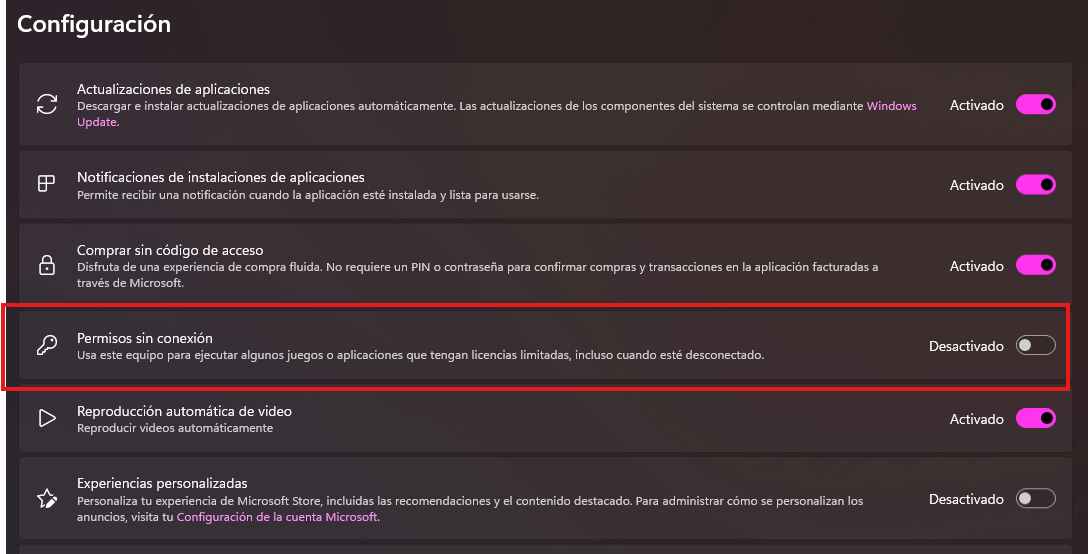
hola, encontré la solución, tienes q desinstalar el juego y luego entrar en ms store, en tu cuenta luego en configuración, y desactivar permisos sin conexión. y luego reinstalar el juego,
Unfortunately, it doesn’t work for me. The Microsoft Store insists on leaving it enabled. I go to Settings, disable the option, accept it, go to the Home screen, go back to Settings, and it’s enabled again.
The switch kept turning back on for me too, I had to enable offline play on a different pc, which automatically disabled it on my first PC. But it didn’t fix the dlc issue.
First install it on a different pc (I used the one with the option offline play enabled) and check if the dlc are loading correctly. (Also, make sure you install a free app from the store so that pc gets registered in your ms account)
Then replace the game and dlc folders in c:\xboxgame with the files from the other computer (you will need an powershell script to keep the original permissions of the replaced files) if Xbox app shows a message to repair or update the game it means the permissions are not correct.
Finally register the appmanifest.xml files, first the main game and then the dlcs.
Sorry for this late reply, Effectively, that’s has resolved my issue,
And I thought it was enough for others, but no. I have checked after did work around.
So I didn’t took a screenshot, I can’t bring a proof, but its worked…
…Until today, there was an update, I hold on hope this will not…
and disappointment, tears, crying, and Why this world is so cruel ??
… just kidding, about last thing I wrote.
This is a problem on their side, we have reported here, and we have to be patient…
Same thing here. Chronicles, Return of Rome, and all expansions say I need them installed if I want to play. They are installed. It just started the other day, the same day the new update dropped.
 GAME INFORMATION
 These details are CRITICAL; DO NOT skip them or your issue may not be reviewed.