With a controller there are two significant disadvantages to mouse and keyboard. One is a lack of buttons that are physically present on the controller compared to the 40 or so keys on a keyboard reachable by the left hand. This can’t really be fixed in any meaningful way besides ensuring that all buttons on the controller are mapped to “useful things” (see my other post on this). The second thing is speed or APM. The key to speed with a controller is to minimize the number of sub-menus that players have to navigate through to get to the desired task, and to put as much structure and consistency into the radial menus as possible so that controller players can build muscle memory.
Currently, on land maps, there are the 4 primary production buildings:
-
Barracks
-
Archery Range
-
Stable
-
Siege Workshop
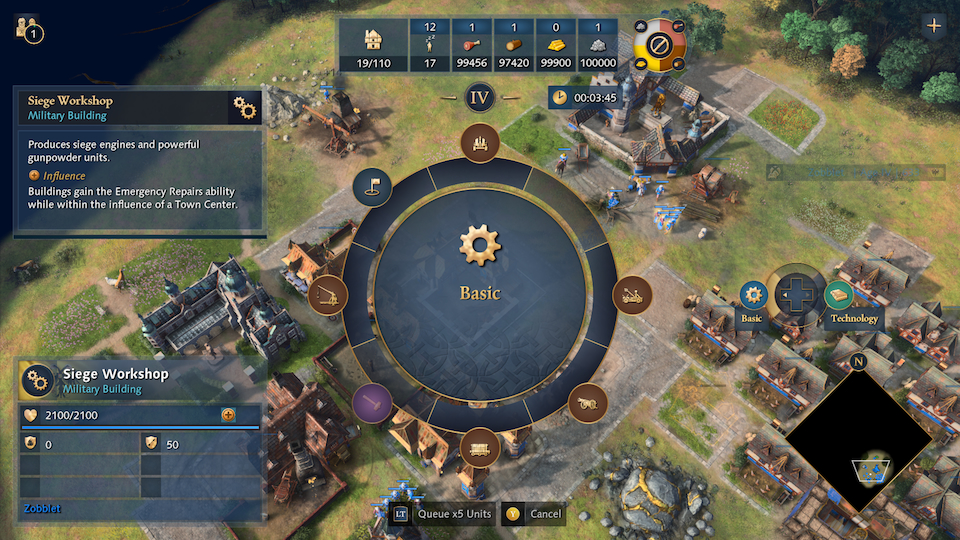
Of these, only the Siege Workshop has a dedicated “tab” i.e. D-Pad Right for “Technology”. All other technologies researchable at Barracks, Archery Range or Stable are located in the “root directory”. Visualized like this:
Barracks
-
Spearman
-
Man-at-Arms
-
Armor Clad
Archery Range
-
Longbowman
-
Crossbowman
-
Handcannoneer
-
Arrow Volley
Siege Workshop
-
Springald
-
Battering Ram
-
Counterweight Trebuchet
-
Bombard
-
Mangonel
-
Ribauldequin
-
Technology
-
Greased Axels
-
Lightweight Beams
-
Roller Shutter Triggers
-
Adjustable Crossbars
-
Geometry
-
Shattering Projectiles
-
Here is a screenshot of the Siege workshop:
And here is the Barracks:
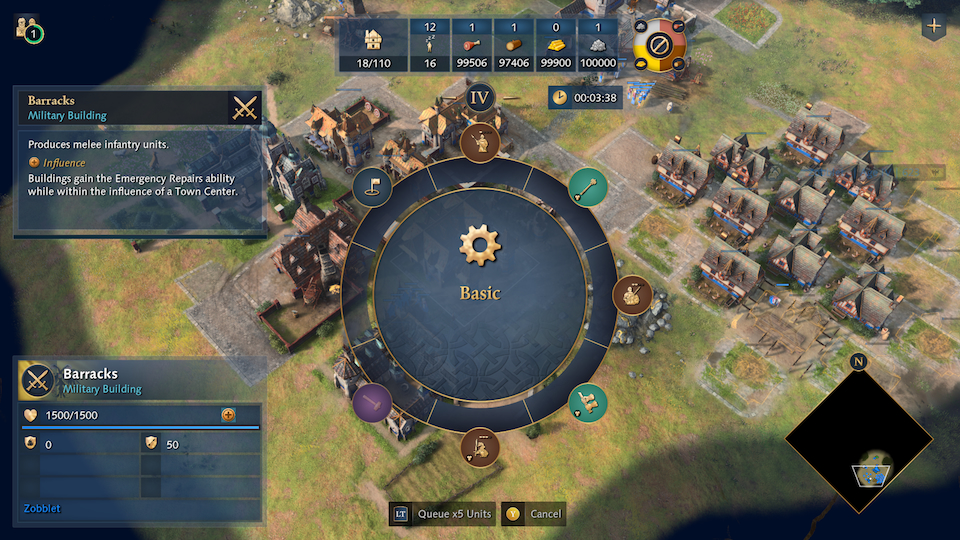
One might argue that since the Barracks only has one technology why put it in its own dedicated tab, and the reason is the “Quick Find Menu” or LB on the XBox. This menu, specifically LB + D-Pad Up (Military Production Buildings) is one of the fastest mid to late game methods for building military units because the game “remembers” that you are in this sub menu i.e. you press LB + D-Pad Up and next time you press LB you automatically see all your Military Production Buildings.
However, currently the Military Production Building Quick Find Menu is just a somewhat random concatenation of the 4 primary military production buildings including technologies in the ‘root directory’ of each building. All seige workshop technologies end up in their own dedicated tab (D-Pad Right or “Technology”). IF we were to move each of the Technologies in each of the respective Military Production Buildings into its own sub-directory then they would subsequently (in theory) move into the “Technologies” tab on the Quick Find Menu as well. So
Barracks
-
Spearman
-
Man-at-Arms
-
Technology
- Armor Clad
Archery Range
-
Longbowman
-
Crossbowman
-
Handcannoneer
-
Technology
- Arrow Volley
You get the point. So that addresses one problem with the Military Production Building radial menu. Next we get to the issue of standards. Back to my topic of speed or APM on the controller. The only way to improve this over time is by building muscle memory, so you intuitively know that 3 o’clock on the Economy Buildings production menu is a mining camp and 4 o’clock is a Mill (note: these are annoyingly swapped with only the French civ). On the Military Production Building Radial Quick Find Menu (LB + D-Pad Up) there is no order, and it changes if units are upgraded. Here is a screenshot with House of Lancaster where upon upgrading to Elite the Yeoman swap places with the Springald.
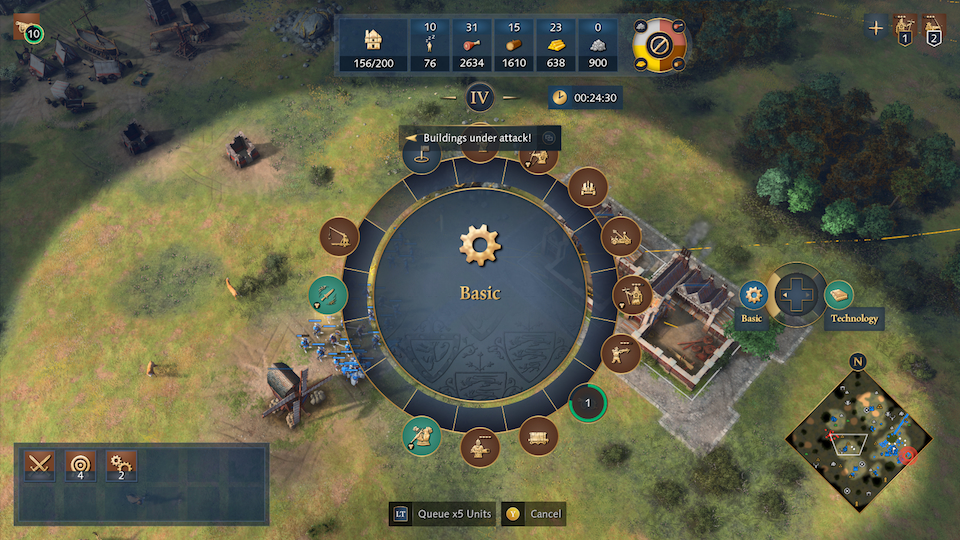
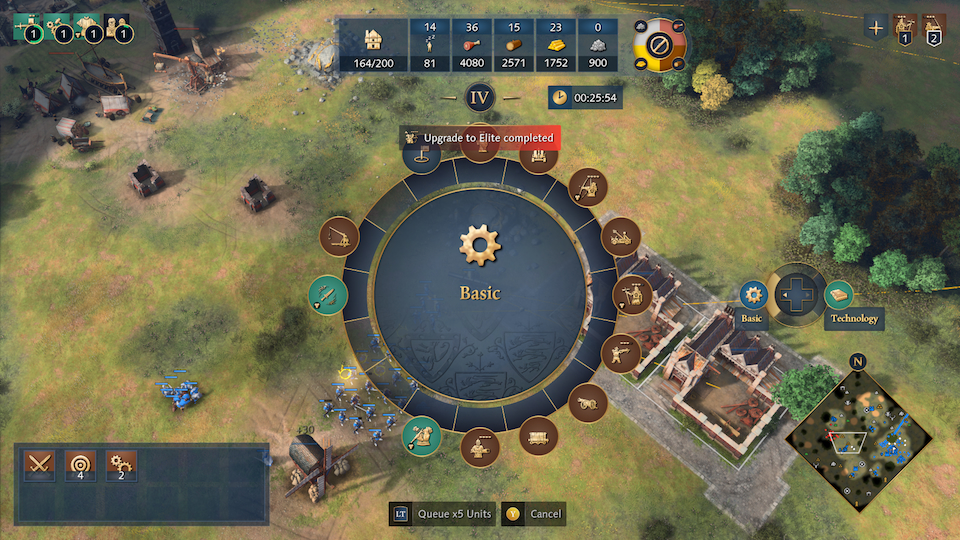
So there is no real logic behind which this radial menu gets constructed (that I can see at least). Which got me thinking: lets just start from first principles here. If we are constrained to a radial dial of units with 16 slots (one of which must be the Rally Point) how do we design the “best” radial menu so that we can satisfy 70-80 percent of use cases for military unit production in AOE4.
If we break the radial into 4 quadrants for the 4 primary production buildings, each building then has 4 “positions” that can be used (except the last one). Spear/Archer/Horseman are going to be on the primary axis. But, what I need community help/input on is what goes into the tertiary and quartenary slots? There are lots of civ specific unique units that might fit into these categories, and I haven’t taken the time to note them all down - but to me this is the level of rigor that I think this radial menu needs. And the positions need to be static of course.
| Barracks | Archery Range | Stable | Siege |
|---|---|---|---|
| Spear | Archer | Horseman | Springald |
| MAA | X-Boww | Knight | Mango |
| Civ Unique | Handcannon | Cav Archer | Treb/Ram/Bombard |
| Civ Unique | Civ Unique | Civ Unique | Rally Point |
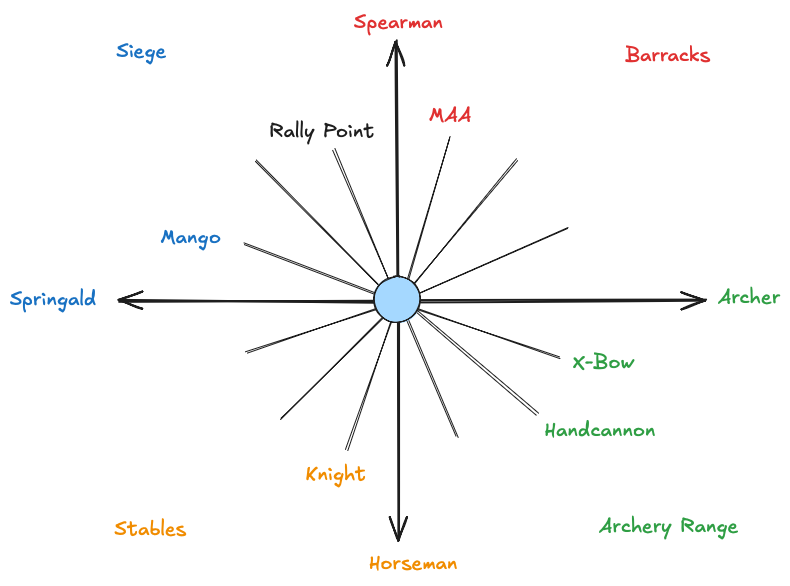
Finally, we get to the problem of the “other” military buildings that currently cannot be found in any menu. These are the Ottoman Military Schools and the Mercenary camps for Byzantines and Macedonian Dynasty. LB + Dpad Right or “Find Buildings” brings up a menu that is consistent for every single civilization in the game. There are always 12 slots. Mill is always at 12 o’clock, blacksmith at 3, TC’s at 6 and Keeps at 9. The problem is 12 slots isn’t enough for the civs with buildings that don’t fall into one of these 12 categories (namely Ottoman, Byz and Macedonia). Therefore I’d argue that this particular radial menu actually needs 16 slots for all civs to keep things consistent across all civs. Most of them will have extra spaces but at least Ottoman, Biz and Macedonias will have a mechanism to get to the special military buildings.
