It’s been an issue for at least 14 hours. Still nothing.
Same issue here. Yesterday installed game through game pass. Started game. Stuck on that screen.
Same issue … After the update, I only played one game, then it will get stuck…
I have the same issue which makes me very annoying, but my friend doesn’t have this issue and i don’t know why. We both use the pc game pass by the way.
I have same issue
also i use xbox game pass PC
I want to play new season T .T
Okay so I found out that you can start the game when you are offline. But whenever I’m trying to go into the online-mode the game hangs. So it has definitely something to do with Xbox Gamepass and Connection Issues.
i wanna play onlne rank new season 
Got a “clue”. warnings.log looping this line. It seems a bug of checking game pass license.
(E) [22:26:35.518] [000014064]: GsdkXboxPlatform::GetUserLicenseToken, Ms Store Product Id from the XStoreQueryProductForCurrentGameAsync does not match the MS Store Product Id from runtime setting
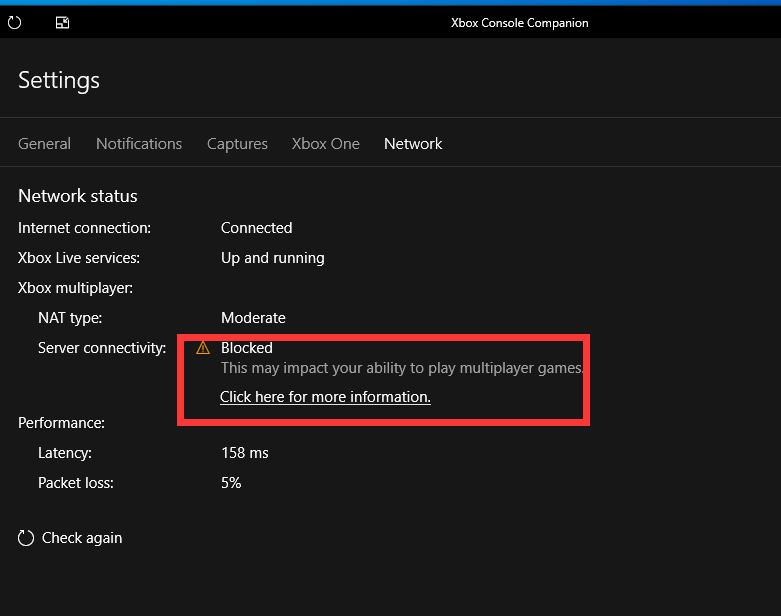
have you tried to reinstall xbox?
reinstalling the game or xbox app doesn’t work. already tried
are you all from Australia? I’ve heard it’s only happening for Australian users.
kazakhstan. same story. reinstall and any exotic dancing just doesn’t work. i thought a reason is that a game pass is not available in my country, but it seems not)))
Did you try to check integrity files in steam ?
i don’t see any steam mentioning. what about game-pass?
I have the same problem. I’m using xbox game pass and my PC uses AMD CPU and AMD graphics card.
im using xbox game pass too, ive uninstalled and manually updated Xbox in the Microsoft store. will respond when the install is done.
I reinstalled in xgp and failed to launch again. This is quite annoying.
Sorry you are running into this! Please do contact support with your DxDiag and warnings.log file. It’ll help the team figure out why you are seeing this. Much appreciated!